Migrating Scripts to Functions: the realistic guide for merchants
Your Shopify Scripts already stopped running. This isn't a developer tutorial written before the deadline — it's the fastest, most honest route back to the checkout rules you lost, written for merchants dealing with the aftermath.
Paste the .rb file or a section of Shopify's customizations report — the AI reads it once and never executes it.
You review in the simulator
Every mapped rule runs against real cart scenarios first. Nothing goes live until you've watched it behave correctly.
Works on any plan
Scripts were Shopify Plus-only. Public Functions apps like Scriptly run the same migration path on every Shopify plan.
Most "migrate Shopify Scripts to Functions" guides were written before June 30, 2026, for developers who still had live Ruby scripts to port ahead of a deadline. If you're reading this now, that deadline has already passed: editing froze on April 15, execution stopped silently on June 30, and your checkout has quietly reverted to Shopify's native defaults. You don't need a migration plan — you need the shortest path back to the pricing, tagging, or payment-method logic that just disappeared. That's what this guide covers.
The good news is that nothing about this is theoretical anymore. Shopify Functions has been the official replacement path for over a year, thousands of merchants have already made the switch, and the tooling for doing it without hiring a developer has matured. The bad news is that most of what's been written about it assumes you're planning ahead of a cutover, not reacting to one that already happened silently in the background of your store. This guide skips the planning talk and goes straight to: here's your old Script, here's where it can live now, here's exactly how to get it there.
S
This wasn't optional. Shopify retired the Script Editor and stopped running Shopify Scripts on June 30, 2026, directing merchants to move discount, shipping and payment logic to Shopify Functions. Every Script went dark on that date, whether or not a migration was ready.
Before you can migrate anything, you need the actual logic your Script used to run. Execution stopped, but the code itself is still your best spec for what to rebuild:
Shopify's Scripts customizations report. Shopify publishes a report that inventories what your Scripts were doing before the freeze — see Shopify's transitioning-to-Functions documentation for how to pull it.
Old developer or agency handoffs. Most merchants using Script Editor paid someone to write the Ruby once. Check old email threads, invoices, or shared repos for the .rb files.
Your own notes on intent. If you documented why a rule existed — "hide COD for international customers," "10% off 3+ units" — that plain-English intent matters more than the exact Ruby syntax.
You don't need to read Ruby fluently. You need to know what the rule was supposed to do — a discount, a shipping change, a payment-method restriction — and who it applied to.
This step matters more than it looks. Skipping straight to "just rebuild something similar" is how merchants end up with rules that look right but quietly behave differently than the original — a wholesale discount that applies to the wrong tag, a free-shipping threshold that's off by a few dollars. Pulling the real source, even secondhand from a report or an old email, is what keeps the migration accurate instead of approximate.
The three migration routes
There are exactly three ways to get from a dead Script to a working Shopify Function, and they have very different effort levels.
Low effort
1. Native admin features
Free, built into Shopify Admin (Discounts, Payment customizations UI, shipping settings). No app, no code — but limited to whatever conditions Shopify's own UI exposes. Fine for the simplest rules, but most Script logic outgrows it fast.
Low–medium effort
2. A public Functions app
From the Shopify App Store, works on any plan — not just Plus. No developer needed; you configure rules through the app's interface instead of writing WASM yourself. Most Script logic fits here, usually in an afternoon rather than a dev sprint.
High effort
3. Custom Functions
Plus-only. A developer writes and deploys custom WASM Functions through a custom app. Real engineering work, code review, and ongoing maintenance, but unlimited flexibility for logic no rule-builder can express.
For the vast majority of merchants whose Scripts did tiered pricing, tag-based discounts, or payment-method rules, route 2 is the realistic choice. It's not a downgrade — it's the replacement path Shopify built for exactly this kind of logic. Route 1 is worth checking first only if your old Script was simple enough that Shopify's native discount and payment settings already cover it outright; for anything with conditions layered on conditions, it won't.
The migration flow at a glance
Three steps, no code, and nothing goes live until you approve it.
Export / paste your Script
Drop in the old .rb file, or the relevant section of Shopify's customizations report.
Scriptly maps it to a rule
The AI matches your logic to a rule template and shows a confidence score with the source lines it used.
Preview in simulator & enable
Test it against real cart scenarios, then turn it on only once it matches what the old Script did.
Route 2 in practice: paste your Ruby into an AI importer
Here's what that looks like inside Scriptly, step by step:
Paste your old Ruby
Drop the .rb file content — or just the relevant section from the customizations report — into Scriptly's importer.
Let the AI map it to templates
It reads the script once and never executes it, matching the logic to Scriptly's rule templates: tiered quantity, tag-based pricing, BOGO, spend threshold, payment-method rules, and more.
Review the confidence score and source quotes
Each mapped rule comes with a confidence level and the exact lines of your original Ruby it was based on, so you can verify the AI understood the intent instead of trusting a black box.
Check it in the simulator
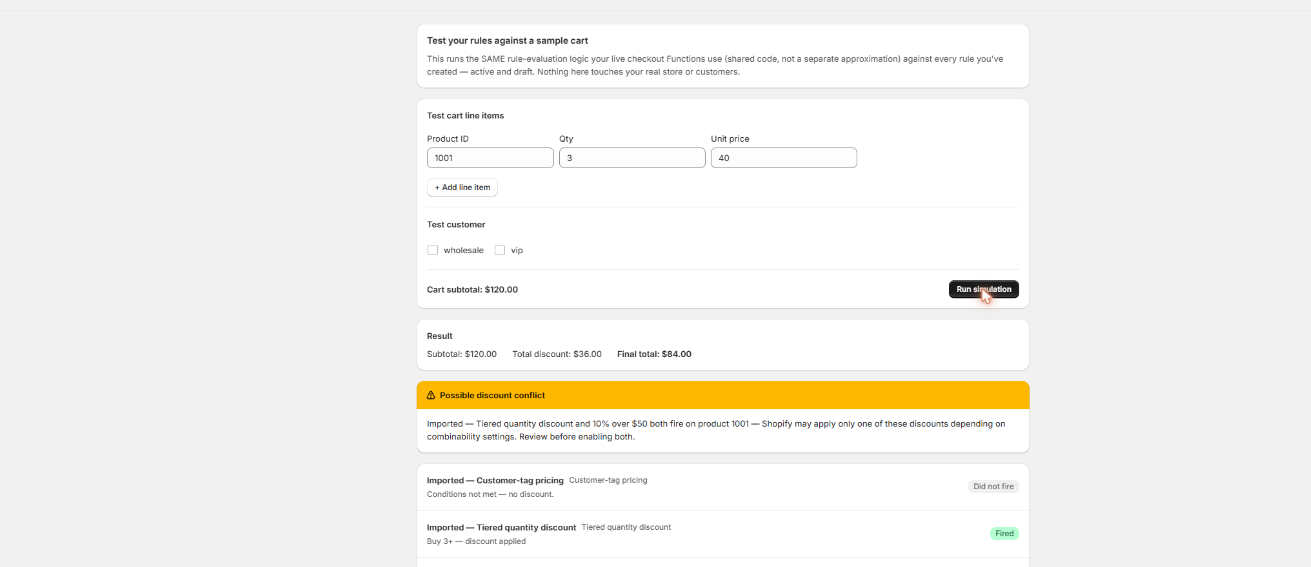
Before anything goes live, run it through Scriptly's simulator against real cart scenarios — it shares the same evaluation code as the live Function, so what you see is what checkout will do.
Approve and enable
Nothing activates automatically. You review each draft rule and turn it on only once it matches what your old Script did.
See the mapped rule before it goes live
Every rule Scriptly maps from your old Ruby runs through the same simulator — test it against real cart scenarios before anything touches checkout.
Scriptly · rule simulator
Click to enlarge The real Scriptly simulator — the same one you'll use to check each rule mapped from your old Script.
What maps cleanly — and what doesn't
An honest breakdown, not a sales pitch. Some Script logic translates almost one-to-one; some needs to be restructured into a slightly different shape; a small slice can't be replicated by any Functions app, from any vendor, no matter how the migration is done.
Maps cleanly
Single-tier volume discounts (buy 3, get 10% off)
Tag-based pricing (wholesale/VIP customer tags)
Spend-threshold discounts
Basic BOGO (cheapest matching item free)
Free shipping over a set amount
Payment method hide / reorder / rename by display name
Needs adaptation
Multi-tier stacked breakpoints — becomes one rule per tier, not a single nested script
Collection-scoped logic — pick specific products instead of "if collection = X"
Arbitrary tag logic — matching is against a fixed list of tags, not free-form strings
Custom "which item is free" logic — approximated as the cheapest matching line
Hiding accelerated checkouts or BNPL methods — impossible for any Functions app, Scriptly included
If most of your old Script falls in the left column, expect a straightforward, same-day migration. If it leans right, plan on splitting one clever Ruby script into two or three explicit rules — more configuration, but each rule easier to audit than the original code ever was.
If you're on Plus with truly custom logic
If your original Script did something genuinely custom — cross-referencing external inventory mid-checkout, running math no rule-builder can express — custom Functions development is the legitimate answer, not a shortcut you're failing to find.
That route means: a Plus plan, a developer, a custom app, and WASM Functions written and maintained specifically for you. Choose it when your logic depends on external API calls, calculations no configuration UI enables, or guaranteed sub-5ms performance for something genuinely bespoke.
For the other 90%+ of Scripts — pricing, tagging, payment display — that level of engineering is more machinery than the problem needs. Try a Functions app built to replace Scripts first, and only escalate to a developer once you've confirmed the rule-builder genuinely can't express what you need.
How long this actually takes
For most merchants coming from a handful of Scripts — a volume discount, a wholesale tag rule, a payment-method restriction — the whole migration through an AI importer and simulator fits into a single sitting: paste the Ruby, review the mapped drafts, spot-check them against a few real cart scenarios, and enable. There's no deployment step, no code review, and no waiting on a developer's calendar. Merchants with a larger stack of Scripts, or logic that lands in the "needs adaptation" column, should expect to spend more time reviewing and splitting rules than pasting code — but that's still measured in an afternoon, not a sprint. Only genuinely custom logic on Plus with a developer involved turns this into a multi-week project, and that's the exception, not the norm.
FAQ
My Scripts stopped working on June 30, 2026 — is it too late to migrate?
No. The code stopped executing, but the logic isn't gone — your old Ruby, or Shopify's customizations report, is still a valid spec you can migrate from at any time.
Do I need to know Ruby to do this?
No. Scriptly's AI importer reads the Ruby, but you review the result in plain-language templates and a visual simulator — never in code.
Will the AI importer put anything live automatically?
No. It only creates drafts. You review the confidence score and source quotes, test in the simulator, and manually enable each rule yourself.
What if my Script logic doesn't map to any template?
That's the "needs adaptation" list above — you'll either restructure it as several simpler rules, or, for the payment-method exceptions like BNPL, accept that no Functions app anywhere can replicate it.
Is a Functions app enough, or do I need custom development?
For discounting, tag-based pricing, and payment-method rules, a Functions app is the intended replacement. Custom Functions development is for genuinely custom logic, not the common cases.
Does this work if I'm not on Shopify Plus?
Yes. Public Functions apps like Scriptly work on any Shopify plan; only custom Functions development requires Plus.
Stop rebuilding from memory
Paste your old Ruby, review the AI-mapped rules, test them in the simulator, and go live when you're ready — not before.