Discounts stopped applying at checkout? Here’s the most likely reason.
If a discount, wholesale price, or special rate quietly disappeared from your Shopify checkout sometime after June 30, 2026, you’re not imagining it — and it’s probably not a bug in your theme or your discount setup. It’s almost certainly a dead Shopify Script.
Why discounts stopped (Scripts retired)
Shopify stopped executing every Script Editor script on June 30, 2026. The discount record in your admin can still show “active” — the logic behind it simply doesn’t run anymore.
The fix (no-code Functions rule)
Rebuild the same tiers, tags, BOGO logic, or spend threshold as a form-based rule on Shopify Functions — no Ruby, no developer, no Script Editor to reopen.
Live at checkout again in minutes
Preview the rebuilt rule in the simulator against a sample cart, then switch it on. It applies automatically at checkout, the same way the Script used to.
What changed on June 30
Shopify Scripts — the Ruby customizations that ran through the old Script Editor app — stopped executing entirely on June 30, 2026. That single date is why so many merchants are suddenly seeing full-price carts, missing wholesale pricing, or checkouts that look like a plain, unconfigured Shopify store. If you’ve read about the shutdown in general, our full Scripts post-mortem covers the whole timeline; this page is specifically about diagnosing and fixing a missing discount.
The change was silent by design. Shopify didn’t throw an error or flag the missing logic anywhere — checkout simply fell back to its native defaults: standard admin-configured discounts, every payment method visible in its default order, and whatever flat shipping rates are set in Settings → Shipping. If your store relied on a Script for anything beyond that baseline, it’s gone until you rebuild it, and nothing in your admin will tell you that on its own.
Was it a Script? Run this checklist
Answer these honestly before you touch your discount settings. The more of these that are true, the more confident you can be that a dead Script — not a bug — is the cause.
-
1
Did the discount exist and work before June 30, 2026?
If it worked one day and vanished the next without you changing anything, that timing alone points straight at Scripts.
-
2
Is your store on Shopify Plus, or was it when the discount was set up?
Script Editor was a Plus-only app. Non-Plus stores can’t have run Scripts, so a discount that disappeared there has a different cause.
-
3
Did the discount apply automatically, with no code to enter?
Scripts ran invisibly — no discount code, no banner, it just happened at checkout. If your customers had to type a code, this isn’t a Script issue.
-
4
Does it involve tiers, customer tags, BOGO, or a spend threshold?
These four patterns were almost exclusively built as Scripts before Functions existed, since Shopify’s native admin discounts never supported them directly.
-
5
Check Apps → Script Editor
If the app is still installed, anything listed there, even read-only, is exactly what stopped running on June 30. Then pull Shopify’s Scripts customizations report for a full inventory of everything the Script touched.
If most of these check out, you can be confident: it was a Script, not a bug in your theme, your app stack, or your discount configuration. A quick sanity check that trips up a lot of merchants: the discount can look perfectly configured in Shopify’s admin — correct dates, correct amount, status “active” — and still not apply, because the admin discount record and the Script that gave it its actual conditions were always two separate things. The record survived June 30. The logic behind it didn’t.
What does not fix it
Before you spend an afternoon on it, none of these bring a dead Script back:
- Re-saving or re-publishing your existing discounts in the admin. The discount record itself was never broken; the Script that applied its logic is what’s gone. Clicking save again just re-saves the same now-inert record.
- Reinstalling or switching your theme. Scripts ran server-side at checkout, not in theme code, so a theme change has no effect on them at all — checkout in 2026 is largely decoupled from the storefront theme anyway.
- Waiting. There is no reactivation window. Editing froze on April 15, 2026, and execution stopped for good on June 30, 2026 — it isn’t coming back on its own, no matter how long the discount sits configured in the admin.
- Contacting Shopify support to ask for the Script back. This wasn’t a bug or an accidental outage; it was a planned, permanent shutdown. Support can help you find your old Script’s logic, but not restore it.
The only real fix is to rebuild the logic on Shopify Functions, the platform’s replacement for Scripts, using either a native admin feature or an app built specifically for this migration.
How to get each discount type back
Once you’ve confirmed it was a Script, here’s the rebuild path for each common pattern — either Shopify’s native admin, or a Functions app template like the ones Scriptly ships with.
| Discount type that died | Rebuild path |
|---|---|
| Tiered / volume quantity discount | Scriptly: Tiered quantity discount template |
| Wholesale / VIP customer-tag pricing | Scriptly: Customer-tag pricing template |
| Buy X get Y free (BOGO) | Scriptly: BOGO template |
| Spend-threshold discount (e.g. spend $100, save 15%) | Scriptly: Spend-threshold discount template |
| Simple one-off % or $ off the whole order | Native admin: Discounts → create automatic discount |
| Payment method hidden, reordered, or renamed | Scriptly: Payment-method rules template |
| Free or discounted shipping over a threshold | Scriptly: Free shipping over $X template |
Rebuild it in minutes, not a developer sprint
If you still have the old Script’s Ruby — from the Script Editor app, a backup, or your developer — you don’t have to read it line by line. Paste it into Scriptly’s AI importer and it maps the logic to the closest matching rule template, shows its confidence level and the exact lines of Ruby it based that mapping on, and creates the result as a draft. Nothing goes live without your review, and the Ruby itself is read once to generate the mapping — it’s never executed.
From there, run the draft rule against a sample cart in the simulator, which uses the same shared evaluation code as the live Function, before you turn it on for real shoppers. Scriptly’s free plan runs one active discount rule at no cost with no credit card required, alongside unlimited drafts and the full simulator, so you can confirm the fix works before committing to anything. See our step-by-step migration guide for the full walkthrough from old Script to live rule.
See the rebuilt discount before it goes live
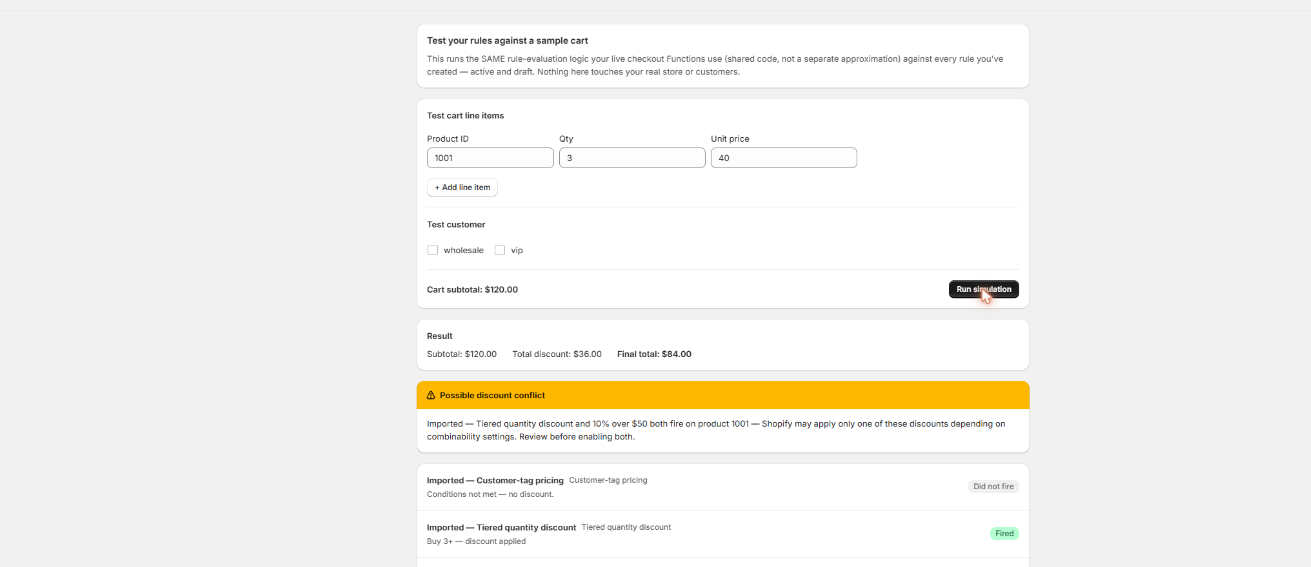
Build a test cart at the same conditions your old Script checked, and Scriptly’s simulator shows exactly what the shopper will pay — nothing touches your real checkout until you’ve watched the rule work.
Click to enlarge
The real Scriptly simulator — confirm the rebuilt rule matches the old Script before you turn it on.
Frequently asked questions
My discount still shows as ‘active’ in the admin — why isn’t it applying?
An automatic discount can stay marked active in Shopify’s admin even though the Script that gave it its logic stopped running on June 30, 2026. The discount record and the Script that powered it are two different things — the record survived, the logic didn’t.
I don’t have Shopify Plus — could this still be a Script issue?
No. Script Editor was Plus-exclusive, so a non-Plus store never had Scripts to lose. If a discount broke on a non-Plus store, look at the discount’s own conditions, combination settings, or an app conflict instead.
Is there any way to get the old Script running again temporarily?
No. Execution stopped for every Script, on every store, on June 30, 2026, and there’s no reactivation switch. The path forward is rebuilding the logic on Functions, not restoring the Script.
What if I never saved a copy of the Ruby code?
Pull Shopify’s Scripts customizations report first — it inventories what your Scripts did even if you don’t have the source. From there you can rebuild manually with the matching rule template rather than importing Ruby.
Can I get wholesale pricing back if my B2B customers aren’t tagged consistently?
Only customers who are logged in and carry the exact tag your rule checks for will match — the same limitation Scripts had. Guest checkouts never match tag-based pricing, so tagging consistency matters as much as the rule itself.
Get your discount back before it costs you another order.
Scriptly’s free plan rebuilds one active rule at no cost, no credit card. Paid plans add unlimited rules, payment & shipping rules, and the AI Ruby importer.