Shopify Scripts are gone. Here’s exactly what happened — and your three ways forward.
On June 30, 2026, every Shopify Script stopped executing — silently. No error, no warning. If you ran custom discounts, payment rules, or shipping logic through the old Script Editor app, your checkout quietly reverted to Shopify’s native defaults on July 1. Here’s the full timeline, exactly what broke, and the fastest way to rebuild it without a developer.
What broke (discounts/shipping/payment)
Tiered and volume discounts, wholesale pricing, BOGO, spend thresholds, payment-method rules, and shipping-rate logic all stopped applying at checkout on June 30, with no error shown to the merchant or the shopper.
Why (Script Editor retired)
Script Editor ran arbitrary Ruby inside the old checkout.liquid rendering path, which Shopify has been retiring for years. Shopify Functions replaces it — compiled, faster, and available on every plan, not just Plus.
What to do now (Functions rules)
Rebuild each Script as a Shopify Functions rule — a native admin discount, a no-code Functions app, or a custom developer build. See your three ways forward below.
The Shopify Scripts timeline
Script Editor was a Shopify Plus-only app that let merchants write Ruby customizations directly into the checkout process. Three script types existed: line-item scripts, which handled discounts; shipping scripts, which adjusted rates and zones; and payment scripts, which controlled which payment methods a shopper saw. For years it was the only way to build checkout logic Shopify’s native admin didn’t support — tiered pricing, wholesale rates, BOGO offers, and more. Here’s how the shutdown actually played out, in the order it happened.
Shopify froze the Script Editor. Merchants could no longer create new Scripts or edit existing ones. Scripts that were already published kept running, read-only, but the countdown to full shutdown had started, and there was no way to add a Script to cover a new promotion or a new product line from this date forward.
Every Script on every store — line-item, shipping, and payment — stopped running at once. There was no checkout-side error and no broken-page warning; the logic simply stopped being invoked mid-checkout, as if the Script had never existed in the first place.
With no Script logic running, checkout fell back to Shopify’s built-in behavior: standard admin-configured discounts, every payment method visible in its default order, and whatever plain shipping rates were configured in Settings → Shipping. For merchants who hadn’t rebuilt anything yet, this is the checkout their customers still see today.
What actually stopped working
Scripts touched three parts of checkout: line items, shipping, and payment. When they went dark on June 30, six categories of merchant logic disappeared at once, with zero notice to the shopper or the merchant.
Custom, tiered & volume discounts
Script-based tiered or quantity-break pricing simply stopped applying at checkout, even though the underlying automatic discount could still show as “active” in the admin. Shoppers buying in bulk quietly paid full unit price with no indication anything had changed.
Wholesale & VIP pricing
Percentage-off rules keyed to a customer tag, like wholesale or VIP, vanished. Logged-in customers with special tags started seeing regular retail pricing, which is especially disruptive for stores that run a B2B channel through the same storefront as retail.
BOGO logic
Buy-X-get-Y-free line-item Scripts stopped triggering. The free unit no longer appeared in the cart, with no substitute logic to replace it, so a promotion that was live in the storefront banner silently stopped delivering at checkout.
Spend-threshold offers
“Spend $100, save 15%”-style Scripts stopped firing regardless of cart size, since the threshold check itself lived inside the Script rather than in a native Shopify discount rule.
Payment-method rules
Scripts that hid, reordered, or renamed payment methods reverted. Every method configured in the store’s payment settings became visible again, in its default order and default name, undoing whatever the merchant had curated for their checkout.
Shipping-rate rules
Zone-based logic, discounted rates, and free-shipping unlocks built as shipping Scripts reverted to whatever flat rates are configured in Settings → Shipping, which for some stores meant every customer suddenly saw the same base rate again.
All six of these categories can fail silently at the same time, which is exactly why they’re easy to miss until a customer complains or a revenue report looks off. If you’re staring at a checkout where a discount just vanished, our discount troubleshooting guide walks through how to confirm it was a Script and how to get it back.
Why Shopify killed Scripts
Script Editor ran arbitrary Ruby inside the checkout process itself — powerful, but slow to load, hard to secure, and tied to the old checkout.liquid rendering path Shopify has been retiring for years. Shopify Functions, its replacement, compiles rule logic to WebAssembly and runs it on Shopify’s own infrastructure in under 5 milliseconds, with no theme or checkout.liquid dependency at all. That architecture is also what makes Shopify’s new checkout faster and more consistent across every store, Plus or not.
Functions are available on every plan, not just Plus, which is why Shopify frames this as a net-positive change for the platform even though it created real short-term pain for merchants. The transition came with no automatic conversion from Ruby to Functions and a hard deadline everyone had to hit at the same time, which is why so many stores are only discovering the breakage now, well after the freeze date, when a customer or a revenue report flags something missing.
Who this hits hardest
Because Script Editor was Plus-only, every store affected by this shutdown is, or was, on Shopify Plus. Within that group, the merchants feeling it most are the ones whose checkout logic went beyond what Shopify’s native admin has ever supported: stores running a wholesale or B2B channel alongside retail, subscription and bulk sellers with tiered quantity pricing, brands running recurring BOGO or spend-threshold promotions, and multi-carrier or multi-zone shippers who built custom rate logic instead of using flat configured rates. If any of that sounds like your store, it’s worth assuming something broke on June 30 even if nobody has complained yet.
Your three ways forward
Shopify itself points merchants toward three paths. None of them is universally “best” — the right one depends on what your old Scripts actually did.
Native admin features
Shopify’s built-in automatic and code-based discounts, configured directly in the admin with no app at all. This is the same starting point Shopify itself points merchants toward for straightforward cases.
Best fit: Simple, one-off promotions that don’t need tiers, tags, or spend thresholds.
Won’t cover wholesale pricing, BOGO, or payment/shipping rules — those need Functions.
An App Store app built on Functions
Prebuilt Functions for the exact patterns most Scripts used: tiered pricing, customer-tag pricing, BOGO, thresholds, payment and shipping rules. Scriptly is one option; see our full comparison of Functions apps for the others.
Best fit: Any plan, any store, no developer needed — most rules are live in minutes, since you’re configuring a template rather than writing code.
You’re working within the app’s template library, not writing arbitrary logic.
A custom Functions build
A developer or agency writes a Function from scratch to match your old Script’s exact logic, line for line, using Shopify’s Functions API directly.
Best fit: Plus stores with genuinely unusual logic and in-house or agency developer time to spend on it.
Custom apps built on Functions are Plus-only, and you’re back to maintaining code going forward.
Do this first, before you rebuild anything
It’s tempting to jump straight into an app and start recreating rules from memory. Don’t. A few minutes of inventory work up front saves you from rebuilding the wrong things, or missing a rule that was quietly worth real revenue. Work through these four steps in order.
-
1
Pull your Scripts customizations report
Shopify publishes a report that inventories what your old Scripts did, at help.shopify.com/en/manual/checkout-settings/script-editor/transitioning-to-functions. Start there before rebuilding anything.
-
2
List what each Script actually did
For every Script still listed in Apps → Script Editor, write down its type — line-item, shipping, or payment — and its exact condition and effect. This becomes your rebuild spec.
-
3
Rebuild your highest-revenue rules first
Not every Script mattered equally. Start with the discount or pricing rule that touched the most orders, not the one you remember most clearly.
-
4
Test with a simulator before you go live
Before any rule reaches real shoppers, run it against a sample cart. A rule that looks right on paper can behave differently once it hits Shopify’s actual discount-stacking logic, especially if you have more than one rule active at a time. Our migration walkthrough covers this step by step.
Working through these four steps in order — inventory, spec, priority, test — is the difference between a rebuild that quietly restores lost revenue and one that just adds a second layer of guesswork on top of the first.
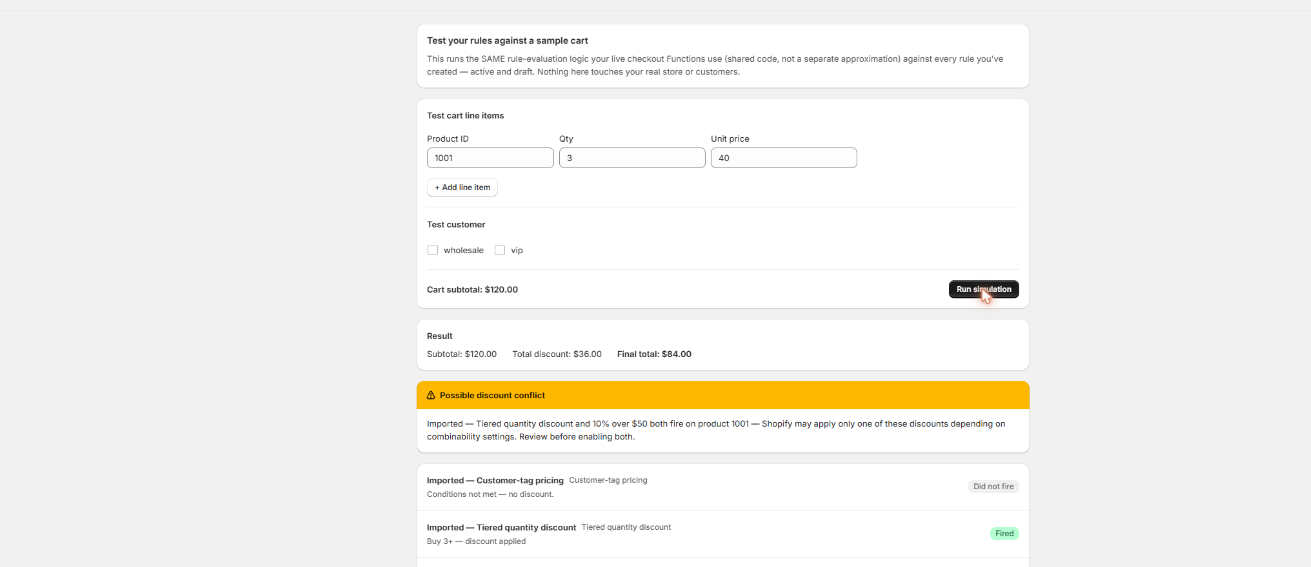
See the rule before it replaces your Script
Scriptly’s simulator runs a test cart through the rule using the same evaluation logic as checkout — nothing goes live until you’ve watched it work.
Click to enlarge
The real Scriptly simulator — test any rebuilt rule against a sample cart before it goes live.
Frequently asked questions
Are Shopify Scripts really gone for good?
Yes. Editing and publishing froze on April 15, 2026, and every Script — line-item, shipping, and payment — stopped executing entirely on June 30, 2026. There is no way to reactivate a Script.
Do I need Shopify Plus to fix this?
No, not necessarily. Scripts themselves were Plus-only, but their replacement, Shopify Functions, is available on every plan through App Store apps. You only need Plus if you want to build a fully custom Function yourself.
Will Shopify automatically convert my old Ruby Script to a Function?
No. There is no automatic conversion. You, or an app with an AI importer, have to translate the logic manually into the new system — the Ruby is a reference, not something that runs as-is.
How do I know what my old Scripts were doing?
Pull Shopify’s Scripts customizations report, and check Apps → Script Editor for whatever is still listed there read-only. Between the two you can reconstruct exactly what each Script did before you rebuild anything.
Why didn’t my checkout show an error when Scripts stopped?
By design. Shopify simply stopped invoking Script logic and fell back to its native checkout defaults — no error banner, no broken page, just quietly different behavior at checkout starting July 1, 2026.
What’s the fastest way to get a discount rule back?
For common patterns — tiered pricing, customer-tag pricing, BOGO, spend thresholds — an App Store app built on Shopify Functions is normally the fastest path, since the template already exists and you configure it rather than build it from scratch.
Can I get my payment method visibility rules back?
Yes, with a Functions app that supports payment customizations, with one exception: no third-party Function can hide Shopify’s own accelerated or BNPL payment methods, such as installments — only merchant-added ones.
What happens to guest checkouts under customer-tag pricing rules?
Same limitation as before: a rule keyed to a customer tag only matches a logged-in, tagged customer. Guest checkouts never match tag-based pricing, whether the rule runs on a Script or on Functions.
Stop losing checkout revenue to a dead Script.
Scriptly rebuilds the exact patterns most Scripts ran — tiered pricing, wholesale/VIP tags, BOGO, thresholds, payment & shipping rules — as no-code Functions. Free plan, no credit card.