Shopify tiered & quantity discounts — rebuilt without code
Buy-more-save-more pricing was one of the most common Shopify Script Editor use cases before the shutdown. Here's the honest, no-code way to rebuild volume and quantity-break discounts on Shopify Functions in 2026 — including exactly what to know before you build the rule.
Applied automatically at checkout — no discount code to type
No code, no developer
Set a quantity threshold and a discount in plain form fields. No Ruby, no Script Editor, nothing to deploy.
Works on any plan
Scripts were Shopify Plus-only. Scriptly's Functions-based rules run on every Shopify plan.
Live at checkout in minutes
Build it, preview it in the simulator, switch it on. The discount then applies itself at checkout.
See the exact discount before it goes live
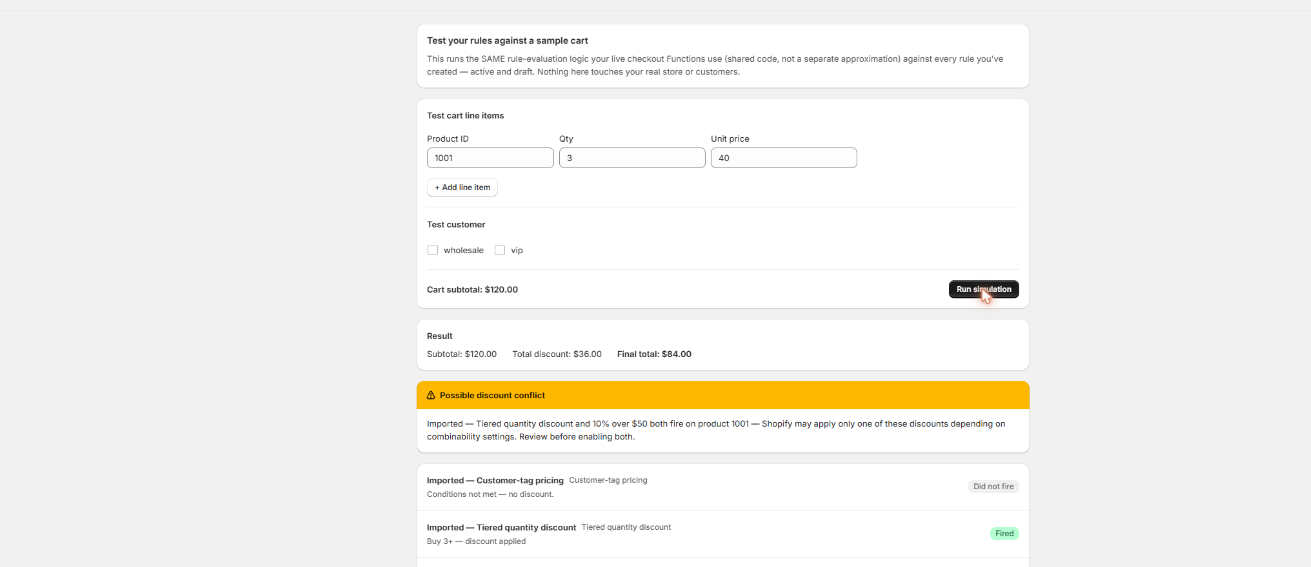
Build a test cart at the trigger quantity and Scriptly's simulator shows precisely what the shopper will pay — nothing touches real checkout until you've watched the rule work.
Scriptly · rule simulator
Click to enlarge The real Scriptly simulator — test any rule against a sample cart before you enable it.
Why merchants ran quantity-break discounts
Volume pricing — sometimes called quantity breaks, tiered discounts, or bulk discounts — was one of the most common discount Scripts merchants wrote in the Script Editor, because native Shopify discount codes were never built to reward quantity automatically at checkout. A merchant wanted the tenth unit in the cart to visibly cost less than the first, applied instantly, with no code for the shopper to type in. Typical reasons stores built this:
Push average order value up
"Buy 3, save 10%" nudges a customer already holding two items toward a third, without running a blanket sitewide sale that discounts shoppers who were never going to add more.
Reward bulk and B2B buyers
Wholesale and case-pack customers expect a lower unit price at higher quantities. A flat coupon code doesn't scale with cart size the way a quantity-threshold rule does.
Move slow inventory in bulk
Apply a steeper break to specific slow-moving products only, clearing stock without discounting the rest of the catalog along with it.
Simplify a messy promo calendar
Replace a rotating manual discount-code promotion with a standing rule that only activates once a shopper actually hits the quantity that earns it.
None of that logic survived June 30, 2026. Shopify stopped executing every Script Editor script platform-wide — as we cover in detail here — and checkout reverted to full, non-tiered pricing with no warning to shoppers or merchants. Scriptly rebuilds the same buy-more-save-more logic as a no-code rule running on Shopify Functions.
S
This wasn't optional. Shopify retired the Script Editor and stopped running Shopify Scripts on June 30, 2026, directing merchants to move discount, shipping and payment logic to Shopify Functions. Every volume-discount Script went dark on that date.
The rule itself comes down to three decisions, not a script: how many units trigger the discount, how much comes off, and what it applies to. None of it requires touching code or waiting on a developer.
Open the "Quantity discount" rule template
Start from Scriptly's quantity-break rule builder.
Set the quantity threshold
Define "buy N or more" — for example, 3 units or more of a qualifying product.
Choose percentage or fixed amount off
A percentage discount (10% off) or a flat amount per unit ($3 off each) — whichever matches how the old Script priced it.
Scope it to specific products or the whole cart
Apply the discount to the products you choose, or let it apply across the whole cart once the threshold is met.
Preview in the simulator
Build a test cart at the threshold quantity and confirm the discount lands exactly where expected before anyone sees it.
Enable the rule
It goes live as a Shopify Function, applying automatically at checkout — no discount code for the customer to enter.
Try it: a quantity discount in action
Drag the quantity to watch a buy 3+, save 20% rule reprice the cart in real time — the exact same math Scriptly runs at checkout.
Quantity in cart
Unit price $30.00 · rule: buy 3 or more, save 20% on the tee
Subtotal$90.00
Volume discount (20%)−$18.00
Customer pays$72.00
Illustrative example. Below 3 units the discount simply doesn't apply — no code, no discount code to type.
What to know before you build the rule
Read this before you migrate a multi-tier Script
Scriptly matches the common single-tier volume discount exactly — buy N or more, get a set percentage or fixed amount off. That covers the large majority of quantity-break Scripts we see.
If your old Script stacked several different tier breakpoints in one script — for example 3+ units at 10% off, 5+ at 15% off, and 10+ at 20% off, all handled by a single Ruby file — you'll need one Scriptly rule per breakpoint for now, rather than one rule holding the whole ladder. Each threshold gets its own rule, so all the tiers still run, just as separate rules instead of one.
Collection-wide scoping isn't available yet. Pick the specific products a rule applies to rather than pointing it at an entire collection; for a large catalog, that can mean applying the same rule to a list of products rather than one collection reference.
None of this is a hidden catch — it's the honest shape of what a no-code Functions rule can do today. For most stores running a single quantity break per product line, it's a direct, faithful rebuild of the old Script.
Migrating your old volume-discount Script
If you still have the Ruby from your old quantity-break Script, you don't have to rebuild the logic by hand. Paste it into Scriptly's AI Script importer, and it reads the code once — it never executes your Ruby anywhere — to identify the quantity condition and the discount it applied, then maps it to the quantity-discount rule template. You'll see a confidence score and the exact source lines Scriptly matched, and nothing goes live until you review and approve the mapped rule in the simulator.
If your original script combined multiple tier breakpoints in one file, the importer maps each breakpoint to its own rule, consistent with the single-tier limitation above — so a three-tier script becomes three reviewable rules instead of one. If you no longer have the original code at all, skip the importer and fill in the quantity-discount template directly; see our broader Shopify Scripts replacement guide or the migration walkthrough for how the rest of the Script-to-Functions move works.
FAQ
How do I do volume discounts after Shopify Scripts stopped working?
Rebuild the quantity threshold and discount amount as a rule in a Shopify Functions app like Scriptly. Set the quantity that triggers the discount, the percentage or fixed amount off, and which products it applies to — the rule then runs automatically at checkout the way the old Script did.
Can I set quantity breaks without code?
Yes. The quantity-discount rule template in Scriptly is entirely form fields — a threshold, a discount type and amount, and a product scope. No Ruby or code editor involved.
Does it work on the whole cart or specific products?
Either. You can scope a rule to specific products you select, or apply it once the quantity threshold is met anywhere in the cart. Collection-wide scoping isn't available yet, so collections need to be applied as a list of specific products for now.
Can I stack multiple discount tiers in one rule?
Not in a single rule yet. Scriptly matches one quantity threshold and one discount amount per rule. A script that had several tier breakpoints — buy 3 for 10%, buy 5 for 15%, and so on — needs one rule per breakpoint.
Do I need my old Script code to set this up?
No. It speeds up setup through the AI importer if you have it, but you can build the same rule directly from the quantity-discount template without any original code.
Do I need Shopify Plus?
No. Scripts were a Shopify Plus-only feature, but Scriptly's Functions-based rules work on any Shopify plan.
Rebuild your volume discount today
Set the threshold, choose the discount, and preview it in the simulator — live at checkout in minutes, no code and no waiting on a developer.