Hide, reorder, and rename Shopify shipping methods — without code
Shipping-rate scripts used to hide express options for PO boxes, tuck freight quotes away from small carts, and keep local pickup off checkout for the wrong customers. Here's the honest, no-code way to hide, reorder, or rename shipping methods at checkout in 2026 — including the one thing no app, Scriptly included, can do: change a rate's price.
Match a shipping rate by its exact display name, then hide it, move it up or down the list, or swap in a label your customers actually recognize.
Works on any plan (not Plus-only)
Delivery Customization Functions apps like Scriptly run on Basic, Shopify, Advanced, or Plus — unlike the old Script Editor, which required Shopify Plus.
Live at checkout in minutes
Build the rule, preview it in the simulator, and enable it — it then runs automatically through Shopify's native Delivery Customization Function.
See the rule before it goes live
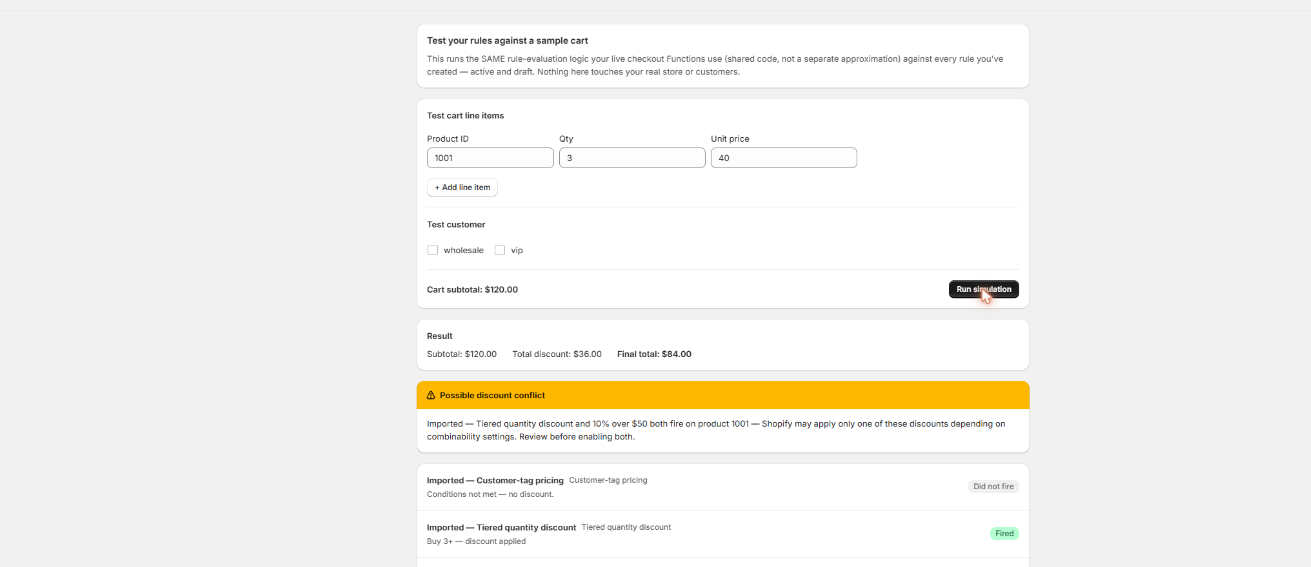
Build a test cart in Scriptly's simulator to see exactly which shipping rates a given shopper would see, in what order and under what label — nothing touches real checkout until you've watched the rule work.
Scriptly · rule simulator
Click to enlarge The real Scriptly simulator — test any rule before enabling it.
Why merchants hide shipping methods
Shipping-rate scripts were one of the more common Script Editor use cases alongside payment method rules — for much the same reason. Shopify's default checkout shows every configured shipping rate to every customer, in whatever order your carrier settings happen to produce, and real stores rarely want that. A few of the recurring reasons merchants build shipping-method rules:
Hide Express for PO Boxes
Express and overnight carriers typically can't deliver to a PO Box, so offering that rate just invites a failed delivery and a support ticket. Pair a shipping-zone restriction in Shopify with a customer-tag condition in Scriptly to hide Express Shipping for accounts you've flagged as PO Box addresses.
Hide freight for small carts
Keep a freight or LTL rate priced for pallet-sized orders, then hide it automatically once the cart total or item count drops below a threshold — so someone buying one small item never sees a quote meant for a full skid.
Limit Local Pickup to the right customers
Show "Local Pickup" only to customers tagged for a specific store location, and hide it for everyone else, so checkout doesn't offer a pickup option that doesn't apply to the shopper looking at it.
Push a preferred carrier first, or rename labels
Move your negotiated carrier rate to the top of the list instead of leaving the order to chance, or replace a carrier's default rate name with wording your customers actually recognize at checkout.
None of this changes what a rate costs — it changes which rates a given shopper sees, in what order, and under what label. That's the same job shipping Scripts used to do, expressed as conditions instead of Ruby.
S
This wasn't optional. Shopify retired the Script Editor and stopped running Shopify Scripts — including shipping-rate Scripts — on June 30, 2026, directing merchants to move checkout logic to Shopify Functions.
A shipping-method rule matches a rate by its exact display name (case-insensitive) — the label your carrier or shipping app shows at checkout, like "Express Shipping (2-3 business days)." Shopify doesn't expose a stable ID for shipping rates to apps, so the name is what a rule keys off of. From there, the rule can hide the rate, move it up or down the list, or change its displayed label — and any of those actions can optionally be limited to a cart total, a customer tag, or specific products in the cart. Once enabled, it runs automatically at every checkout through Shopify's native Delivery Customization Function — no manual work per order, and nothing to maintain unless the underlying rate name changes.
Open the "Shipping method rules" template
Start from Scriptly's delivery-rule builder.
Pick the shipping rate by its exact display name
For example, "Freight Shipping" or "Local Pickup." Case doesn't matter, but the wording has to match what's configured in your Shopify shipping settings.
Set the action
Hide, reorder, or rename — pick one or combine them.
Add conditions if needed
Cart total, customer tag, or products in cart.
Preview in the simulator
Test the rule against real cart scenarios before it goes live.
Enable the rule
It runs through the same Delivery Customization Function Shopify calls at checkout.
What no app can do
Read this before you build a rule
Matching is by exact display name because Shopify doesn't expose a stable shipping-rate ID to apps. If you rename the rate in your Shopify shipping settings later, update the rule too — otherwise it'll silently stop matching.
No Delivery Customization app — Scriptly included — can change what a shipping rate costs. Hiding, reordering, and renaming are the only actions available. If what you actually need is "free shipping over $75," that's a pricing rule, not a hide/reorder/rename rule — use Scriptly's free-shipping rule or Shopify's native shipping settings instead.
Shipping-method rules condition on cart total, customer tag, or products in cart — not on a shopper's raw address. Zone- or postal-code-level restriction is still handled by Shopify's own shipping zones; a Scriptly rule layers on top of that for cart- or tag-based cases.
Works on any plan that can install Functions apps — Basic, Shopify, Advanced, or Plus — unlike the old Script Editor, which required Shopify Plus. That's a genuine improvement, not a workaround.
Guest checkouts can never match customer-tag conditions, because guests aren't signed into an account with tags. Cart-total and product-based conditions still work regardless of login status.
These aren't gaps specific to Scriptly — they apply to every Delivery Customization Function on the platform, because they come from what Shopify exposes to apps, not from how any individual app is built.
FAQ
Can Scriptly change how much a shipping rate costs?
No. Scriptly can hide, reorder, or rename a shipping rate, but it can't change its price. For something like "free shipping over $75," use Scriptly's free-shipping rule instead, or Shopify's native shipping settings.
Why does the rule need the exact shipping rate name?
Shopify doesn't give apps a stable ID for shipping rates — only the display name customers see — so that's what rules match against, case-insensitively.
Do I need Shopify Plus for this?
No. Delivery Customization Functions apps like Scriptly work on any Shopify plan, unlike the old Script Editor, which was a Plus-only feature.
Can I hide a shipping rate for certain postal codes or regions?
Scriptly conditions rules on cart total, customer tag, and products in cart — not on address directly. For zone- or postal-code-level restriction, use Shopify's native shipping zones, then layer a Scriptly rule on top for the cart- or tag-based cases those zones can't cover.
Will this work for guest checkouts?
Customer-tag conditions won't match for guests, since there's no account to check tags against. Cart-total and product-based conditions work regardless of login status.
Did my old Shipping Script carry over automatically?
No. Shipping Scripts stopped executing on June 30, 2026, and nothing carries over automatically — see Shopify Scripts replacement options for the broader picture, then rebuild the logic through a Functions app or native settings.
Set your shipping method rules today
Build the rule, preview it in the simulator, and enable it — all without touching code or waiting on a developer.