Free-shipping-over-amount was one of the most common shipping Scripts merchants ran before Shopify Scripts stopped executing on June 30, 2026. Scriptly rebuilds the same cart-total logic as a no-code rule on Shopify Functions — set a subtotal threshold and shipping becomes free (or discounted) automatically at checkout.
Shoppers a few dollars short of the threshold often add one more item rather than pay for shipping — a well-known nudge a flat rate can't replicate.
No code, no developer
Set a subtotal threshold and a shipping discount in plain form fields. No Ruby, no Script Editor, nothing to deploy.
Live at checkout in minutes
Build it, preview it in the simulator, switch it on. The threshold then applies itself automatically at checkout.
See exactly when shipping goes free
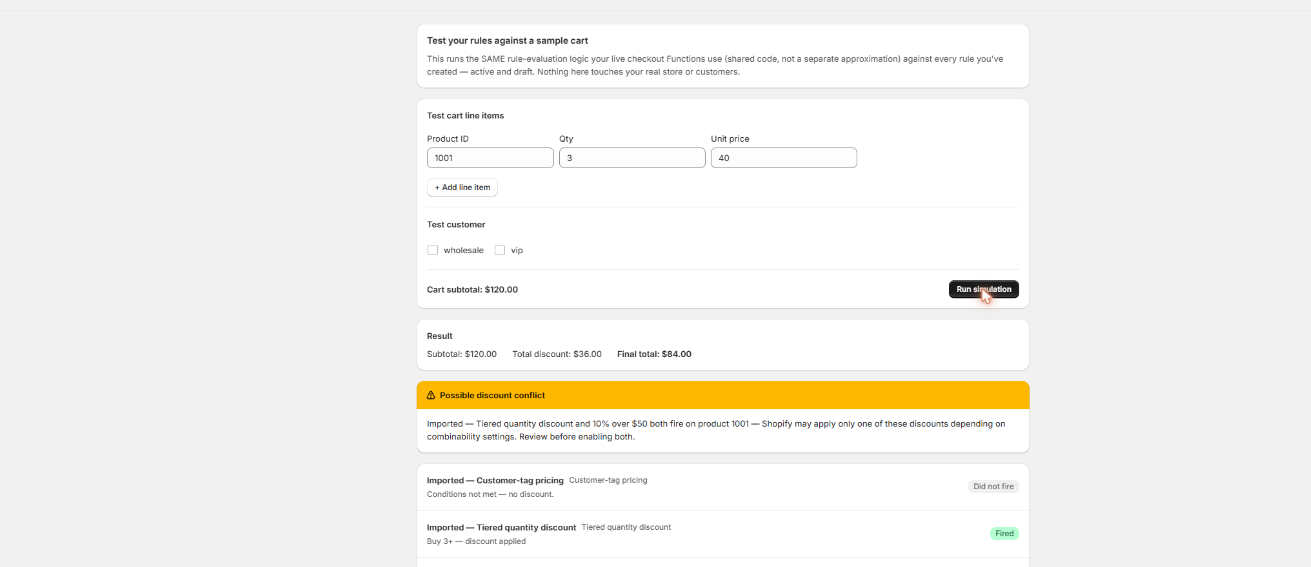
Build a test cart just above and just below your threshold and Scriptly's simulator shows precisely what the shopper will pay — nothing touches real checkout until you've watched the rule work.
Scriptly · rule simulator
Click to enlarge The real Scriptly simulator — test any rule against a sample cart before you enable it.
Why merchants set a free shipping threshold
A free shipping threshold — "spend $75, ship free" — is one of the simplest, best-tested levers a store has for raising average order value. It's also one of the most common cart-total Scripts merchants wrote in the old Script Editor, because Shopify's native settings never gave stores a built-in way to make a shipping rate change based on what's already in the cart.
Raise average order value
Shoppers a few dollars short of the threshold often add one more item rather than pay for shipping — a well-known nudge a flat shipping rate can't replicate on its own.
Match what shoppers expect
A spend threshold for free shipping is common enough across ecommerce that many shoppers assume some version of it exists; matching it keeps checkout competitive without discounting every single order.
Cut shipping-cost abandonment
Unexpected shipping charges are one of the most cited reasons carts get abandoned at checkout; a clear spend threshold sets the expectation before a customer ever reaches the shipping step.
Ran quietly as a Script for years
Many stores wrote this logic once in the Script Editor and never touched it again — until Shopify Scripts stopped executing on June 30, 2026, and shipping reverted to whatever rates were configured, threshold and all.
That's exactly what happened at the shutdown: checkout reverted to native shipping rates, and for most stores that meant the free-shipping threshold simply stopped applying — no warning to the shopper, and often none to the merchant, until someone noticed a $150 order getting charged full shipping. Scriptly rebuilds that behavior on Shopify Functions, Shopify's supported replacement for Scripts, as a rule you configure with a subtotal field — not Ruby. For the wider picture of what replaced Scripts across discounting, shipping, and payment logic, see our Shopify Scripts replacement guide.
S
This wasn't optional. Shopify retired the Script Editor and stopped running Shopify Scripts on June 30, 2026, directing merchants to move discount, shipping and payment logic to Shopify Functions. Every free-shipping-threshold Script went dark on that date.
No Ruby, no discount code for the shopper to remember — once the cart subtotal crosses your line, the rule applies automatically at checkout. Here's the setup:
Set your subtotal threshold
Pick the cart-total amount that triggers the rule — for example, $75.
Choose free or discounted shipping
Take 100% off shipping for free shipping, or set a percentage or fixed amount off instead if you'd rather discount shipping than eliminate it entirely.
Scriptly checks the cart subtotal at checkout
As soon as the items in the cart clear your threshold, the discount is applied to shipping automatically — before the customer enters any code, because there isn't one to enter.
Preview it in the simulator
Build test carts just above and just below your threshold and confirm shipping behaves correctly at both, before the rule goes live.
Turn it on
Enable the rule and it starts running through the same Shopify Function Shopify calls at checkout.
Try it: free shipping over $75
Drag the cart subtotal to watch a free shipping over $75 rule reprice the order in real time — the exact same math Scriptly runs at checkout.
Cart subtotal
Threshold: free shipping over $75 · illustrative flat shipping rate of $8.00 shown below the threshold
Subtotal$60.00
Add $15.00 more for free shipping$8.00
Total$68.00
Illustrative example with an $8.00 flat shipping rate below the threshold. Above $75, shipping drops to $0.00 automatically.
How this rule is actually built
Read this before you set a threshold
Scriptly's free-shipping-over-amount rule is built as a shipping discount — using the discount Function's shipping-discount target — not a delivery customization. That's a deliberate choice, not a limitation dressed up as one, and it's worth understanding why.
Shopify gives apps two separate tools for touching shipping at checkout: delivery customizations, which can hide, rename, or reorder the delivery options a shopper sees, and discount functions, which can actually change what a rate costs. Delivery customization's API has no way to change a rate's price — only which options are shown and in what order. A free-shipping threshold changes a price, so it has to be built as a discount.
Because it's a discount, it applies to every delivery option in the cart at once once the threshold is met — not selectively to one carrier or shipping speed while leaving the others full price. That uniformity is a strength, not a shortcut: there's no per-method configuration to keep in sync, and the rule behaves the same way no matter which shipping method the customer eventually picks.
The threshold is checked against the cart subtotal — the value of the items in the cart before shipping and tax are added. A $75 threshold triggers once product totals reach $75, regardless of which shipping method ends up chosen.
This is the same approach every reliable shipping-threshold Functions app takes, because it's the tool Shopify built for changing a price at checkout — not a workaround. It also means the rule can't make one carrier free while leaving express shipping at full price; if you need to hide or reorder specific shipping methods instead of changing their price, that's a separate delivery-customization rule. See our guide to hiding shipping methods on Shopify.
Migrate your old free-shipping Script
If you still have the Ruby from your dead free-shipping Script, you don't need to rebuild it from scratch by reading old code line by line. For the broader picture of moving any Script to Shopify's replacement, see our guide to migrating Shopify Scripts to Functions.
Paste the Ruby into Scriptly's AI importer. It reads your Script once — it never executes your Ruby anywhere — and maps the subtotal threshold and discount type to the shipping-discount rule template, showing a confidence score and the exact source lines it matched.
Review before anything goes live. Nothing is enabled automatically. You check the mapped threshold against what your Script actually charged, adjust the amount or discount type if needed, and approve it yourself.
Test it in the simulator with carts just above and just below your threshold, and confirm shipping goes free (or discounts correctly) at the right subtotal before you enable the rule for real customers.
FAQ
How do I set up free shipping over a spend amount on Shopify without code?
Use Scriptly's rule builder to set a cart-subtotal threshold and choose free or discounted shipping, preview it against test carts in the simulator, then turn the rule on. It runs as a Shopify Function — no Ruby, no developer required.
Is this a delivery customization or a shipping discount?
It's a shipping discount, built on the discount Function's shipping-discount target — not a delivery customization. Delivery customization can hide, rename, or reorder shipping options, but it can't change what a rate actually costs, so a real price change has to be a discount.
Does free shipping apply to every delivery option, or just one?
Every delivery option in the cart at once. Once the threshold is met, the discount applies uniformly rather than to a single carrier or shipping speed while leaving the rest full price.
Is the threshold checked against the subtotal, or the total including shipping and tax?
The subtotal — the value of items in the cart before shipping and tax are added. A $75 threshold triggers once product totals reach $75.
Can I give a percentage or fixed discount off shipping instead of making it fully free?
Yes. Choose 100% off for free shipping, or set a percentage or fixed amount off shipping instead if you'd rather discount it than eliminate it entirely.
Do I need Shopify Plus for this?
No. Scripts were a Shopify Plus-only feature, but Scriptly's shipping-discount rules run as Shopify Functions and work on any Shopify plan.
Will my old free-shipping Script carry over automatically?
No. Nothing carries over automatically — you rebuild the rule through the AI importer or the rule builder and review it yourself before enabling it.
Bring back your free-shipping threshold
Set your subtotal, preview it in the simulator, and turn it on — no code, no waiting on a developer.