Shopify BOGO app: buy X get Y and free-gift rules, no code
Buy-one-get-one was one of the most common line-item Scripts in the old Script Editor — and one of the first things merchants noticed missing when Shopify Scripts stopped running on June 30, 2026. Scriptly rebuilds BOGO, buy X get Y, and free-gift-with-purchase logic as a no-code rule that runs on Shopify Functions at checkout.
Second item free — applied automatically at checkout
No code, no developer
Pick the qualifying product, the free product, and the quantity in plain form fields. No Ruby, no Script Editor, nothing to deploy.
Works on any plan
Scripts were Shopify Plus-only. Scriptly's Functions-based BOGO rules run on every Shopify plan.
Live at checkout in minutes
Build the rule, preview it in the simulator, switch it on. The free item then applies itself automatically at checkout.
Preview the free item before it goes live
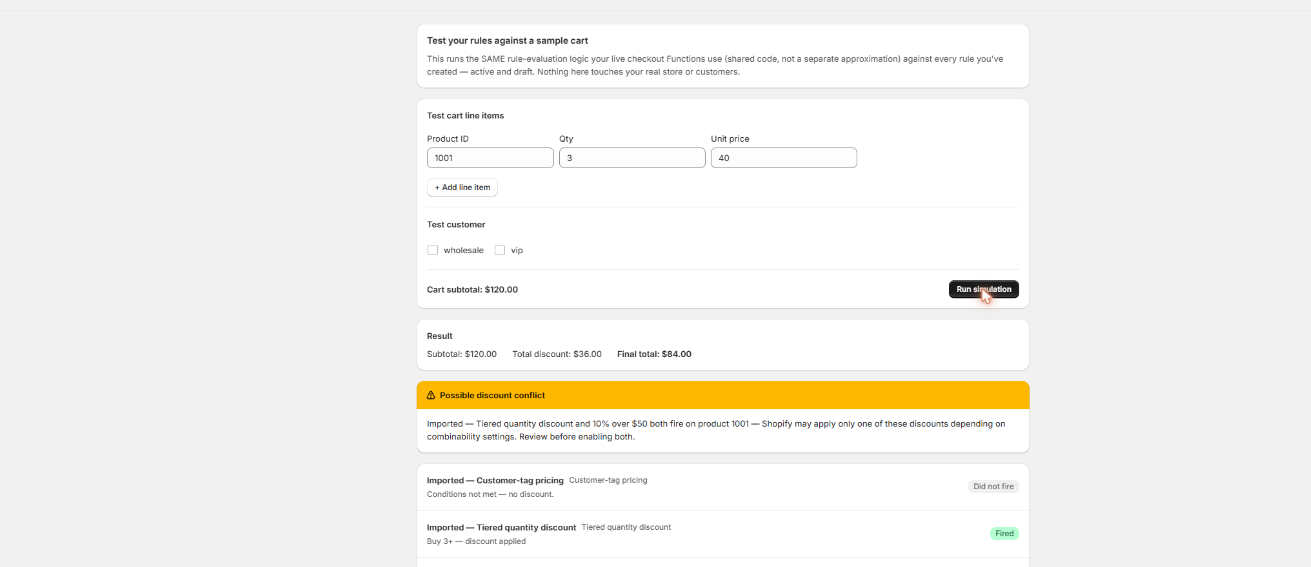
Build a test cart at the qualifying quantity and Scriptly's simulator shows exactly which unit goes free and at what price — nothing touches real checkout until you've watched the rule work.
Scriptly · rule simulator
Click to enlarge The real Scriptly simulator — test any rule against a sample cart before you enable it.
Why BOGO ran as a Script in the first place
Shopify's native discount codes were never built to give away one specific item for free based on what else is sitting in the cart — a code can only take a percentage or fixed amount off a product, a collection, or the whole order. "Buy one, get one free" and "buy 2, get 1 free" don't fit that shape, so merchants who wanted real BOGO reached for the Script Editor: a line-item Ruby Script that scanned the cart, found the eligible free item, and zeroed out its price at checkout.
Buy one, get one free
The classic version — buy 1 of a product, the second matching unit rings up free, automatically, no code entered by the shopper.
Buy X, get Y free
A higher qualifying quantity, like buy 2 get 1 free — common for lower-margin, high-volume items where a straight percentage discount cuts too deep.
Free gift with purchase
Buy a qualifying product (or hit a quantity threshold) and a separate gift product — a sample, an accessory, a promo item — becomes free in the cart.
Bundle-style giveaways
Pair a hero product with a lower-priced companion item that drops to $0.00 once the qualifying product is in the cart, encouraging the bigger purchase.
That logic disappeared for good when Shopify Scripts stopped running platform-wide on June 30, 2026. Checkout reverted to whatever native discounts were configured — for most stores, that meant BOGO simply stopped applying, with no warning to the shopper and often no warning to the merchant either, until someone noticed a "free" item ringing up at full price.
Scriptly rebuilds that behavior on Shopify Functions, Shopify's supported replacement for Scripts, as a rule you configure with dropdowns and quantity fields — not Ruby. For the wider picture of what replaced Scripts across discounting, shipping, and payment logic, see our Shopify Scripts replacement guide.
S
This wasn't optional. Shopify retired the Script Editor and stopped running Shopify Scripts on June 30, 2026, directing merchants to move discount, shipping and payment logic to Shopify Functions. Every BOGO Script went dark on that date.
No Ruby, no discount code for the shopper to remember — the rule just runs automatically once the cart qualifies. Here's the setup:
Pick the qualifying product and quantity
For example, "buy 2" of a specific product or a set of products.
Pick the free product
The same product for a classic BOGO, or a different one for a free-gift-with-purchase offer.
Set the free quantity
Usually 1 — how many units of the free product the offer covers.
Scriptly matches it automatically at checkout
The moment a cart meets the qualifying quantity, a matching unit of the free product drops to $0.00 — before the customer enters a discount code, because there isn't one to enter.
Preview it in the simulator
Build a test cart with the qualifying quantity, run it, and confirm the right item and price show up before you turn the rule on.
The one thing every Functions BOGO app should tell you
Read this before you set up BOGO
Scriptly's BOGO is implemented as a 100% discount on the cheapest matching line in the cart — the standard Shopify Functions approximation of buy-one-get-one. That's a deliberate, transparent choice: it means the free item is always a specific, real line in the cart, it applies the same way on every order, and it's the selection logic every Functions-based BOGO app on the platform uses, because it's what Shopify Functions can actually see.
If your old Script picked the free item some other way — for example, always the first unit added to the cart regardless of price, or a custom rule that wasn't "cheapest first" — the two won't match exactly. Functions apps don't get access to cart insertion order, only to what's currently in the cart and each line's price, so cheapest-matching-line is the only selection logic available.
For the vast majority of BOGO setups — buy 1 get 1 of the same product, or a free-gift item that isn't sold at multiple price points — this distinction never actually surfaces, because the cheapest matching unit and the "obvious" free unit are the same unit.
It only matters if your catalog sells the qualifying or free product at several different prices at once (multiple variants, a sale price alongside a regular price) and your original Script used custom logic to choose which specific unit went free.
This isn't a Scriptly-specific gap — it's a boundary of what Shopify Functions expose to every app on the platform, not something any vendor can build around. We'd rather you know it before you enable a rule than find it in your first order.
Migrate your old BOGO Script
If you still have the Ruby from your dead BOGO Script, you don't need to rebuild it from scratch by reading old code line by line.
Paste the Ruby into Scriptly's AI importer. It reads your Script once — it never executes your Ruby anywhere — and maps the qualifying product, quantity, and free product to the BOGO rule template, showing a confidence score and the exact source lines it matched.
Review before anything goes live. Nothing is enabled automatically. You check the mapped rule against what your Script actually did, adjust the qualifying quantity or free product if needed, and approve it yourself.
Test it in the simulator with a cart that matches your qualifying quantity — especially if your catalog has multiple price points for the free product, since that's the one case where the cheapest-matching-line logic above is worth double-checking against your old Script's behavior. If your original Script also handled quantity-break pricing alongside BOGO, that's a separate rule — see our guide to tiered quantity discount rules.
FAQ
How do I run BOGO after Shopify Scripts shut down?
Shopify Scripts stopped executing entirely on June 30, 2026, so any BOGO logic that lived in a Script Editor Ruby file stopped applying at checkout. A Shopify Functions app like Scriptly rebuilds the same "buy X, get Y free" behavior as a rule you configure with dropdowns and quantity fields — no code, no discount code for the shopper.
Can I do buy one get one without code?
Yes. You pick the qualifying product and quantity, the product that becomes free, and the free quantity — all through form fields in Scriptly's rule builder. No Ruby, no developer required, and the rule runs automatically once the cart qualifies.
Which item becomes free in a BOGO rule?
The cheapest unit of the free product currently matching your rule gets a 100% discount, bringing it to $0.00. That's the standard Shopify Functions approximation of BOGO. If your old Script used custom logic to pick a different unit (not cheapest-first), the two won't match exactly — see the limits section above.
Can I run buy X get Y with two different products (free gift with purchase)?
Yes. The qualifying product and the free product don't have to be the same item — set a qualifying product and quantity, then choose a separate gift product to become free once that quantity is met.
Do I need Shopify Plus for this?
No. Scripts were a Plus-only feature, but Scriptly's BOGO rules run as Shopify Functions and work on any Shopify plan.
Will my old BOGO Script's exact free-item logic carry over automatically?
No. Nothing carries over automatically — you rebuild the rule through the AI importer or the rule builder and review it yourself before enabling it. If your Script used custom, non-cheapest-first selection logic for the free item, expect to double-check that specific behavior in the simulator.
Bring BOGO back to your checkout
Set the qualifying product, the free product, and the quantity — preview it in the simulator, then turn it on. No code, no waiting on a developer.