Shopify wholesale & customer-tag pricing — no code
Customer-tag pricing was one of the most common Shopify Script Editor use cases before the shutdown — a customer tagged wholesale or VIP got a percentage off the whole cart automatically, with no discount code to type in. Here's the honest, no-code way to rebuild it on Shopify Functions in 2026, including exactly which tags are supported today.
Applied automatically for tagged customers — no code
Automatic for tagged customers
Tag an account wholesale or vip in the admin and the discount applies itself at checkout — no discount code for the customer to type in.
No separate wholesale catalog
Same storefront, same product pages — tagged accounts just see the reduced price. Nothing extra to build or keep in sync.
Works on any plan
Scripts were Shopify Plus-only. Scriptly's Functions-based rules run on every Shopify plan.
See the tagged-customer discount before it goes live
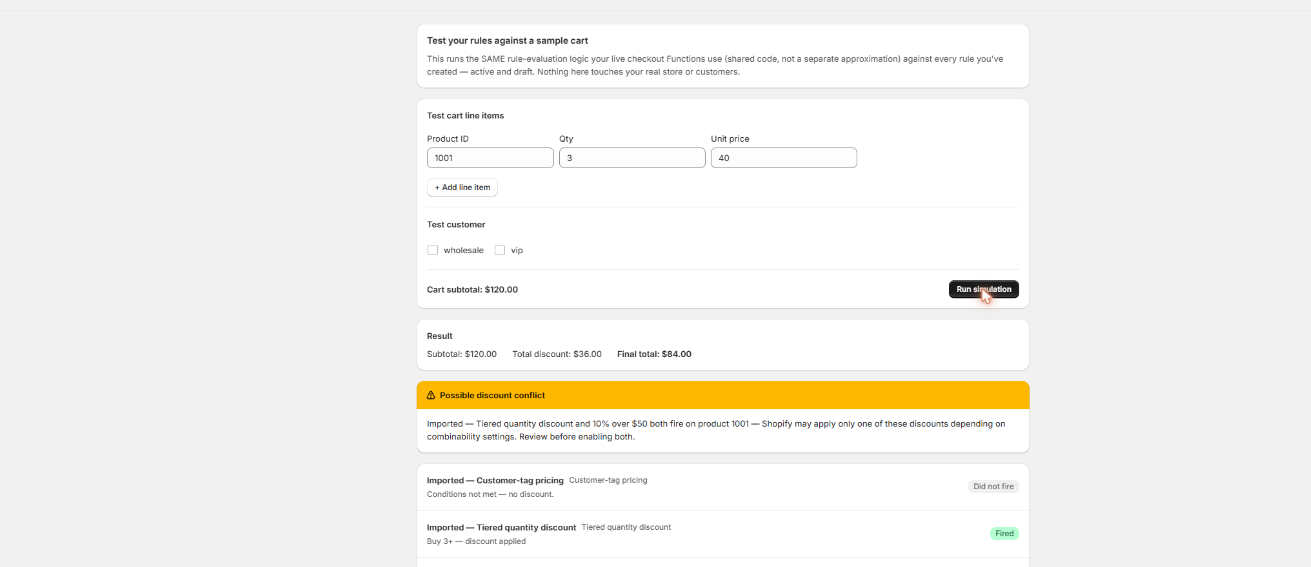
Run a test cart as a customer tagged wholesale or vip and Scriptly's simulator shows precisely what they'll pay — nothing touches real checkout until you've watched the rule work.
Scriptly · rule simulator
Click to enlarge The real Scriptly simulator — test any rule against a sample cart before you enable it.
Why merchants tag customers for pricing
Wholesale and VIP pricing by customer tag was one of the original three Shopify Script types, and one of the most-cited reasons merchants had a Script Editor script running in the first place. Native Shopify discount codes were never built to recognize who a customer is automatically — a code has to be typed in or applied via a link, every single time. A tagged-customer Script solved that: once an account was tagged wholesale or vip in the admin, the discount just applied, at every checkout, with nothing for the customer to do. Typical reasons stores built this:
Reward wholesale accounts without a second catalog
Give approved wholesale customers a flat percentage off the same storefront everyone else shops, instead of building and maintaining a separate B2B catalog or price list just to offer a lower unit cost.
Recognize VIP customers automatically
Give repeat or high-spend customers a standing discount the moment they're tagged, rather than emailing out a one-time code that has to be remembered, copied, and re-issued.
Skip discount codes for repeat B2B buyers
A wholesale buyer placing weekly reorders shouldn't have to hunt down a code every time — tag-based pricing makes the discount part of who they are as an account, not something they carry around.
Keep public pricing clean
Retail shoppers see the regular price; only tagged accounts see the reduced one. No public coupon to leak, screenshot, or share outside the intended group.
None of that logic survived June 30, 2026. Shopify stopped executing every Script Editor script platform-wide — as we cover in detail here — and checkout reverted to full retail pricing for every customer, tagged or not, with no warning. Scriptly rebuilds the same tag-based pricing as a no-code rule running on Shopify Functions, the same way it rebuilds tiered quantity discounts for buy-more-save-more Scripts.
S
This wasn't optional. Shopify retired the Script Editor and stopped running Shopify Scripts on June 30, 2026, directing merchants to move discount, shipping and payment logic to Shopify Functions. Every wholesale and VIP pricing Script went dark on that date.
The rule comes down to a tag and a percentage, not a script: a logged-in customer tagged wholesale or vip gets a set percentage off the whole cart automatically at checkout. None of it requires touching code or waiting on a developer.
Open the "Customer tag discount" rule template
Start from Scriptly's customer-tag pricing rule builder.
Choose the tag: wholesale or vip
Pick which of the two supported tags the rule should watch for on the customer's account.
Set the percentage off
Define how much comes off the cart once a matching tagged customer is logged in — for example, 15% off for wholesale.
Scope it to the whole cart or specific products
Apply the discount across everything in the cart, or limit it to the products you choose.
Preview in the simulator with a tagged test customer
Run a test cart as a customer tagged wholesale or vip and confirm the discount lands correctly before anyone sees it live.
Enable the rule
It goes live as a Shopify Function, applying automatically the moment a matching tagged customer is logged in at checkout.
What to know before you build the rule
Read this before you tag customers for pricing
Only two tags are supported today: "wholesale" and "vip." Shopify Functions can only check a fixed, build-time list of tags — they can't read an arbitrary tag a merchant types into a text field the way custom Ruby could. Scriptly ships with these two because they cover the large majority of wholesale/VIP naming we see. If your store used a different tag name for the same purpose, tag those customer accounts "wholesale" or "vip" as well so the rule recognizes them.
Logged-in customers only. The rule reads the tags on the identified checkout customer, so guest checkouts never match — there's no customer record for the rule to check tags against. This isn't a new restriction from Functions; the original Script had the exact same limitation, since it also could only read the identified customer, not a guest.
Neither of these is a hidden catch — it's the honest shape of what customer-tag pricing can do on Shopify Functions today. For the common case — a store with wholesale or VIP accounts who log in before ordering — it's a direct, faithful rebuild of the old Script.
Migrating your old customer-tag Script
If you still have the Ruby from your old wholesale or VIP pricing Script, you don't have to rebuild the logic by hand. Paste it into Scriptly's AI Script importer, and it reads the code once — it never executes your Ruby anywhere — to identify the tag condition and the percentage it applied, then maps it to the customer-tag discount rule template. You'll see a confidence score and the exact source lines Scriptly matched, and nothing goes live until you review and approve the mapped rule in the simulator.
If your original script checked a tag other than "wholesale" or "vip," the importer will flag that in its match notes so you know to add one of the two supported tags to those customer accounts before the rule goes live. If you no longer have the original code at all, skip the importer and fill in the customer-tag template directly; see our broader Shopify Scripts replacement guide or the migration walkthrough for how the rest of the Script-to-Functions move works.
FAQ
How do I give wholesale customers a discount on Shopify now that Scripts are gone?
Rebuild the tag and percentage as a rule in a Shopify Functions app like Scriptly. Tag the customer account wholesale, set the percentage off, and the rule applies automatically at checkout whenever that tagged customer is logged in — no discount code needed.
Which customer tags does Scriptly support for pricing rules?
Two tags today: "wholesale" and "vip." Shopify Functions can only check a fixed, pre-configured list of tags rather than any tag a merchant types in, so Scriptly's customer-tag pricing rule is built around these two.
Will this work for guest checkouts?
No. Customer-tag pricing only applies to logged-in customers, since the rule has to read tags off an actual customer account. Guest checkouts never match, the same way they didn't with the original Script.
Can I use a custom tag name instead of wholesale or vip?
Not yet. The rule only recognizes "wholesale" and "vip." If your store used a different tag, add "wholesale" or "vip" to those customer accounts so the rule applies to them.
Do I need my old Script code to set this up?
No. It speeds up setup through the AI importer if you have it, but you can build the same rule directly from the customer-tag discount template without any original code.
Do I need Shopify Plus?
No. Scripts were a Shopify Plus-only feature, but Scriptly's Functions-based rules work on any Shopify plan.
Set your wholesale pricing today
Tag the accounts, set the percentage, and preview it in the simulator — live at checkout in minutes, no code and no waiting on a developer.