AI Script importer

Convert Ruby Scripts to Shopify Functions — with AI

If you still have the Ruby from your old Shopify Script, you don't have to translate it by hand. Paste it into Scriptly's AI importer: it reads the code, identifies the condition and the discount logic, and maps it to a no-code checkout rule — with a confidence score and the exact lines it matched, for you to review before anything goes live.

Reads the code, never runs it

The importer parses your Ruby to find the condition and the discount logic. It doesn't execute the script — Shopify already stopped running every Script on June 30, 2026, and nothing about importing brings that execution back.

See exactly what matched

Every mapped rule ships with a confidence score and the exact source lines Scriptly used to build it — so you're reviewing a specific match, not trusting a black box.

You approve it, not the AI

A mapped rule opens in the simulator, not at checkout. Nothing touches a real order until you've reviewed the match and switched the rule on yourself.
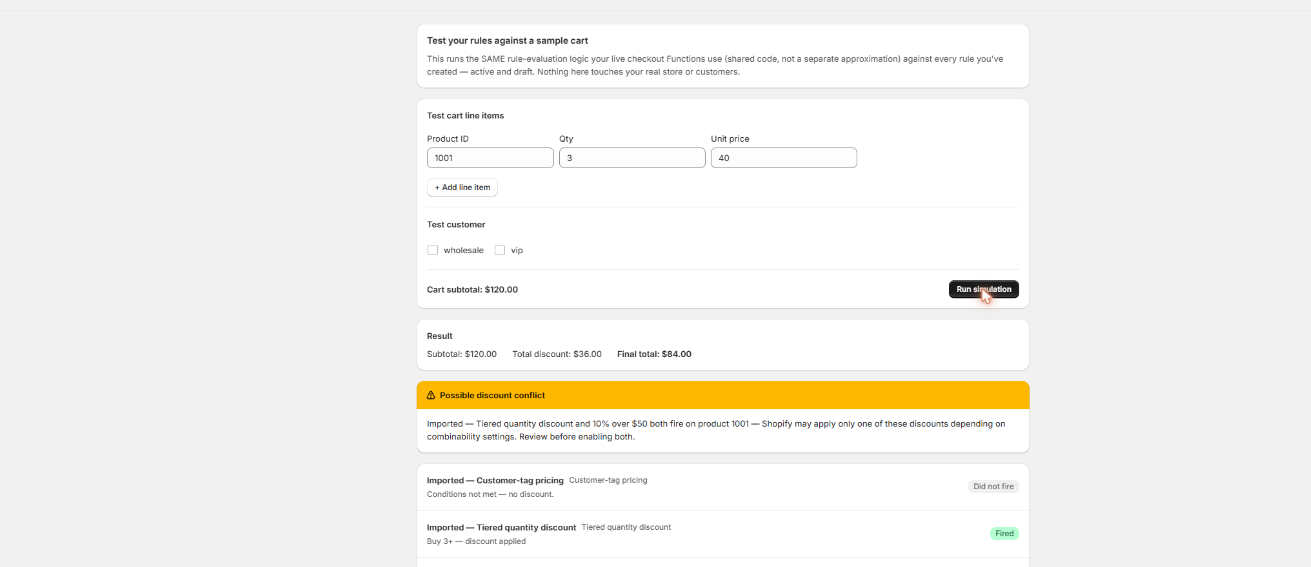
Review the mapped rule before it ever reaches checkout

Whatever the AI importer maps your Ruby to, it lands in the same simulator every rule goes through — build a test cart and watch it apply before you decide it's ready.

Scriptly · rule simulator
The Scriptly rule simulator running a sample cart and showing a discount applied to the line total

Click to enlarge
The real Scriptly simulator — every imported rule runs here before you enable it, same as one built by hand.

Why merchants still have Ruby Script code lying around

Shopify Scripts were written in Ruby, in the Script Editor, usually by a developer who isn't around anymore or by a merchant who copied and tweaked something years ago. When Shopify stopped running every Script on June 30, 2026, that code didn't disappear — it's still sitting in a text file or an old support ticket, describing logic that no longer runs anywhere. A Shopify Functions migrator that can actually read that file saves you from reverse-engineering your own store's checkout rules from memory. Common reasons merchants reach for the AI importer instead of rebuilding from scratch:

The developer who wrote it is gone

Freelancer, agency, past employee — whoever wrote the original Script often isn't reachable. The Ruby file is the only record of what the checkout used to do.

You don't remember the exact conditions

"Something about quantity and a discount" isn't enough to rebuild a rule precisely. The importer reads the actual thresholds and math out of the code instead of guessing.

You have several old scripts, not one

Stores that ran Scripts for years often accumulated a handful — a discount, a shipping tweak, a payment rule. Reading each one is faster than starting every rule from a blank template.

You want a shortcut, not a shortcut that hides logic

A faster setup only helps if you can still see what it's doing. The confidence score and matched lines exist so speed doesn't come at the cost of visibility.

S
This wasn't optional. Shopify retired the Script Editor and stopped running Shopify Scripts on June 30, 2026, directing merchants to move discount, shipping and payment logic to Shopify Functions. The Ruby your old Script ran on is still valid as a record of the logic — it's just no longer executed anywhere.
Source: Shopify Scripts / Script Editor deprecation — what happened & the deadline →

How the AI Script importer converts Ruby to a rule

This is the core of Scriptly's Shopify script editor replacement path: you don't rebuild the logic by re-reading your own Ruby line by line. The importer does the reading; you do the approving.

  1. Open the AI Script importer

    Start a new rule and choose "Import from Ruby" instead of picking a template from scratch.

  2. Paste your old Script's Ruby code

    Copy the full contents of the Script Editor file — condition, discount logic, and any messaging text — and paste it in.

  3. Scriptly reads it — it never executes it

    The importer parses the Ruby as text to find its structure. It does not run the script against a cart or a store, now or ever.

  4. It identifies the condition and the discount logic

    Quantity thresholds, product or cart conditions, percentage or fixed-amount math — the importer picks these out of the code itself, not from a description you type in.

  5. It maps the match to a rule template with a confidence score

    You see which rule template it chose, a confidence percentage, and the exact lines of your Ruby that led to that mapping.

  6. Review low-confidence parts and adjust

    Anything the importer wasn't sure about is flagged rather than silently guessed — check those fields yourself before moving on.

  7. Preview in the simulator, then enable

    Run a test cart through the mapped rule exactly as you would a rule built by hand, then switch it on as a live Shopify Function.

What to know before you rely on the AI importer

The honest limits of a Ruby-to-rule converter

  • The importer is built for the common shape of a Script: one condition, one discount or logic outcome. It maps that shape reliably and shows a high confidence score when it does.
  • Very custom Ruby — nested conditions, multiple discount tiers in one file, or logic outside what a rule template supports — often can't be represented as a single rule. In that case, the importer maps the parts it recognizes to separate rules and flags the rest with a lower confidence score instead of guessing at it.
  • A low confidence score isn't a failure — it's the importer telling you exactly which lines it wasn't sure about, so you can check or rewrite that part of the rule by hand before enabling it.
  • Nothing goes live from an import automatically. Every mapped rule sits in draft, previewable in the simulator, until you review it and turn it on yourself.

For a straightforward Script — one condition, one discount — this is a direct, faithful conversion. For a script your team heavily customized over the years, expect to spend a few minutes confirming or tweaking the parts it flags, not rebuilding the whole thing from zero.

Where to go next depending on your Script

The AI importer works alongside Scriptly's rule templates, not instead of them — it picks a template for you and fills in the fields it read out of your code, but the template itself is the same one you'd use starting from scratch. If your old Script matches a common pattern, it can be faster to go straight to the dedicated guide: rebuilding a tiered or quantity discount or rebuilding a buy-one-get-one rule both cover exactly what the importer maps a matching Script to.

If you're not sure yet whether the importer or a manual template is the right starting point, or you're migrating more than one old Script at once, see the broader Shopify Scripts replacement guide or the step-by-step migration walkthrough for how the rest of the move to Shopify Functions works.

FAQ

How do I convert an old Shopify Script's Ruby code to a Function?

Paste the Ruby from your old Script Editor file into Scriptly's AI importer. It reads the code to find the condition and discount logic, maps it to a rule template with a confidence score, and lets you review the exact matched lines in the simulator before you enable the rule.

Does the AI importer run my Ruby code?

No. It only reads and parses the code as text to identify what it was doing. It never executes your Ruby — Shopify already stopped running every Script on June 30, 2026, and nothing about the import process brings that execution back.

What if my Script is too custom to map automatically?

Very custom Ruby — several discount tiers or nested conditions in one file — often doesn't map to a single rule cleanly. The importer maps the parts it recognizes to separate rules and flags anything it's unsure about with a lower confidence score, so you can finish that part manually instead of being blocked entirely.

What does the confidence score mean?

It reflects how closely the matched section of your Ruby lines up with a known rule pattern, like a quantity threshold paired with a percentage discount. A high score means a close, reliable match; a lower score is a signal to check the flagged lines yourself before enabling the rule.

Can I see which lines of my script were used?

Yes. Every mapped rule shows the exact source lines from your pasted Ruby that the importer used to build it, alongside the resulting rule fields, so you can check the match against your own code.

Do I need my old Script file to use Scriptly?

No. The importer speeds up setup if you still have the Ruby, but you can build the same rule directly from a template with no original code at all — see our Shopify Scripts replacement guide for that path.

Paste your Ruby, see the mapped rule

Import your old Script, review the confidence score and matched lines, and preview it in the simulator before anything goes live — no code rewritten by hand.

Start free on Shopify