Hide Cash on Delivery at Shopify checkout — without code
A refused COD parcel means you've already paid outbound and return shipping for a sale that never happened, and Cash on Delivery skips the one layer of verification a card or wallet payment provides. Banning it outright throws away the customers who'd have paid reliably. Here's the honest, no-code way to hide Cash on Delivery only when the risk is highest — big carts, specific products, or untrusted customers — as a Shopify Functions rule instead of a dead Script.
Condition the rule on cart total, specific products, or a customer tag — Cash on Delivery disappears only for the carts that actually carry return-to-origin or fraud risk, not for every shopper.
Works on any plan (not Plus-only)
Payment Customization Functions apps like Scriptly run on Basic, Shopify, Advanced, or Plus — the old Script Editor needed Shopify Plus.
Live at checkout in minutes
Build the rule, preview it in the simulator, and enable it — it then runs automatically through Shopify's native Payment Customization Function.
See the rule before it goes live
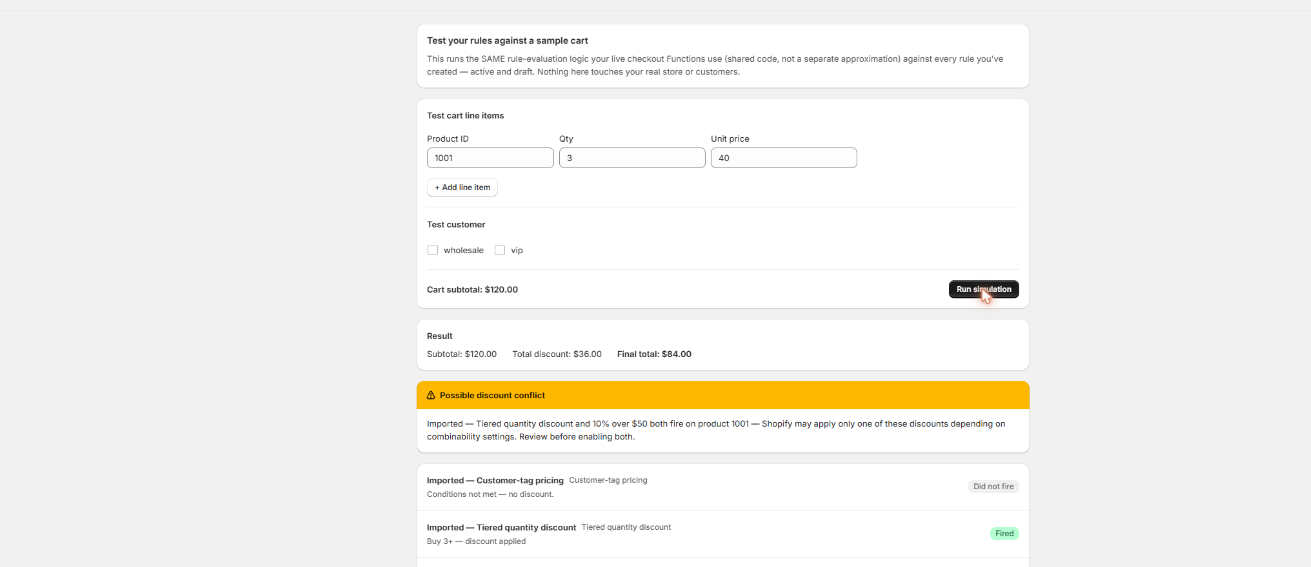
Build a test cart above and below your threshold in Scriptly's simulator to see exactly when Cash on Delivery disappears from the payment list — nothing touches real checkout until you've watched the rule work.
Scriptly · rule simulator
Click to enlarge The real Scriptly simulator — test any rule before enabling it.
Why merchants hide Cash on Delivery
Cash-on-Delivery filtering was a common Script Editor use case for stores selling in regions where COD converts well but also carries real downside — the same kind of logic behind payment method rules generally. Shopify's default checkout offers every configured payment method to every shopper regardless of order size or history, and that default is exactly what got exploited on high-value or first-time orders. A few of the recurring reasons stores hide Cash on Delivery selectively:
Cut return-to-origin (RTO) losses
COD parcels get refused at the door far more often than prepaid orders. When that happens, you've already paid outbound shipping and now pay return shipping too — for a sale that was never actually completed.
Reduce fraud and prank orders
Cash on Delivery requires no card and no upfront charge, which also removes the one external check a fake or prank order would otherwise have to pass. It's a common vector for orders nobody intends to pay for.
Protect high-value carts
Collecting a few hundred dollars in cash at the door raises the stakes on both non-payment and driver safety. Many stores cap Cash on Delivery at a cart-value ceiling instead of removing it entirely.
Keep it for the customers who earn it
Plenty of regions and repeat customers are genuinely reliable with COD. The goal isn't banning it everywhere — it's narrowing where it's offered to the cases with a worse risk profile.
None of this is about removing Cash on Delivery outright — for many stores it's still the payment method that converts best. It's about narrowing when it's offered, the same job COD-filtering Scripts used to do, expressed as conditions instead of Ruby.
S
This wasn't optional. Shopify retired the Script Editor and stopped running Shopify Scripts — including payment Scripts that filtered Cash on Delivery by cart value — on June 30, 2026, directing merchants to move checkout logic to Shopify Functions.
A Cash-on-Delivery rule matches the payment method by its exact display name (case-insensitive) — the label your Shopify payment settings show at checkout, typically "Cash on Delivery" or "COD," whichever wording you configured. Shopify doesn't expose a stable ID for payment methods to apps, so the name is what a rule keys off of. From there, the rule hides that method only when a condition you set is met — cart total over a threshold, specific products in the cart, or a customer tag — and leaves it visible for everyone else. Once enabled, it runs automatically at every checkout through Shopify's native Payment Customization Function.
Open the "Payment method rules" template
Start from Scriptly's payment-rule builder.
Pick "Cash on Delivery" by its exact display name
Match the wording configured in your Shopify payment settings — "Cash on Delivery," "COD," or whatever your store uses. Case doesn't matter, but the wording does.
Set the action to hide
Cash on Delivery disappears from the payment list whenever the rule's condition matches.
Add the condition
Cart total over a threshold (say, over $200), specific products in the cart, or a customer tag for untrusted or first-time buyers.
Preview in the simulator
Build a test cart above and below the threshold to confirm COD disappears exactly when it should — and stays visible otherwise.
Enable the rule
It runs through the same Payment Customization Function Shopify calls at checkout.
What no app can do
Read this before you build the rule
Matching is by exact payment-method display name, case-insensitive, because Shopify doesn't expose a stable payment-method ID to apps. If you rename your Cash on Delivery method later, update the rule too — otherwise it'll silently stop matching.
No Payment Customization app — Scriptly included — can hide Shopify's own accelerated or buy-now-pay-later checkout methods, such as Shop Pay Installments, Shop Pay, or wallet buttons like Apple Pay and Google Pay. Those are controlled by Shopify itself, not by third-party Functions. Only manual or custom payment methods you've configured — like Cash on Delivery — can be targeted this way.
Works on any plan that can install Functions apps — Basic, Shopify, Advanced, or Plus. The old Script Editor required Shopify Plus; this doesn't.
Conditions run on cart total, customer tag, or products in the cart — not on a shopper's raw address or region. For region-level COD restriction, use Shopify's own payment method availability settings by market or country, then layer a Scriptly rule on top for the cart-value or tag-based cases those settings can't cover.
Guest checkouts can never match customer-tag conditions, since a guest isn't signed into an account with tags. Cart-total and product-based conditions still work regardless of login status.
These aren't gaps specific to Scriptly — they apply to every Payment Customization Function on the platform, because they come from what Shopify exposes to apps, not from how any individual app is built.
FAQ
Can I hide Cash on Delivery only for large orders?
Yes. Condition the rule on cart total — for example, hide Cash on Delivery once the cart exceeds $200 — and it stays visible for smaller orders where the return-to-origin risk is lower.
Does hiding Cash on Delivery stop fraud completely?
No. Hiding COD for risky carts removes one common fraud vector, but it isn't a fraud-detection system on its own. Pair it with Shopify's own order risk analysis and your existing verification process for full coverage.
Can Scriptly hide Shop Pay Installments or other Shopify-owned payment methods along with COD?
No. Shop Pay Installments, Shop Pay, and wallet buttons like Apple Pay are controlled by Shopify itself — no third-party Payment Customization Function, Scriptly included, can hide them. Only manual or custom methods like Cash on Delivery can be targeted.
Do I need Shopify Plus for this?
No. Payment Customization Functions apps like Scriptly work on any Shopify plan, unlike the old Script Editor, which was a Plus-only feature.
What if my COD method is named something other than "Cash on Delivery"?
Match whatever your Shopify payment settings actually display — "COD," "Pay on Delivery," "Cash on Pickup," or any other wording your store uses. The rule matches the exact display name, case-insensitively.
Will this affect guest checkouts?
Customer-tag conditions won't match for guests, since there's no account to check tags against. Cart-total and product-based conditions work regardless of login status.