Shopify checkout rules — discounts, shipping & payment, no code
Every checkout rule a Shopify Script used to run — a volume discount, a shipping override, a hidden payment method — stopped working the moment Shopify shut off the Script Editor on June 30, 2026. This is the hub for rebuilding all of it: what "checkout rules" means on Shopify Functions today, and a no-code rule template for every type of Script that went dark.
All three run automatically at checkout — no code, no developer
One place for every rule
Discounts, shipping, and payment logic all build from the same no-code form fields — no separate app or developer for each rule type.
Works on any Shopify plan
Scripts were Shopify Plus-only. Every rule type on this page runs as a Shopify Function on any plan.
Preview before it's live
Whichever rule you build — discount, shipping, or payment — it previews against a sample cart before it ever touches a real checkout.
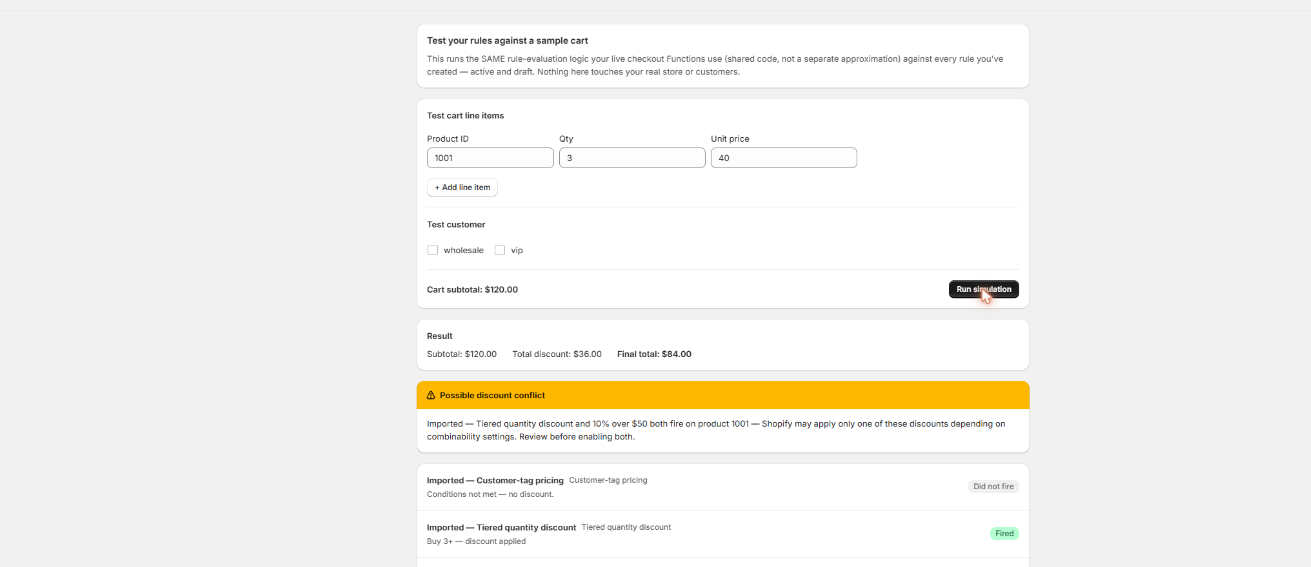
One simulator, every rule type
Whichever rule you build — a discount, a shipping override, a hidden payment method — Scriptly runs it against a sample cart first, so you see exactly what a shopper would see before you switch it on.
Scriptly · rule simulator
Click to enlarge The real Scriptly simulator — it previews every rule type on this page before you enable it.
What "checkout rules" means on Shopify after Scripts
Before June 30, 2026, "checkout rules" mostly meant whatever a merchant had written into the Shopify Script Editor. Scripts hooked into three places at checkout — discounts, shipping rates, and payment gateways — and a store's entire custom checkout logic usually lived in one of those three Ruby files, maintained by whoever wrote it, if anyone still could.
When Shopify stopped executing Scripts platform-wide, checkout didn't pause gracefully — it reverted to defaults. Discount Scripts stopped applying, so carts that should have been discounted rang up at full price. Shipping Scripts stopped hiding or reordering rates, so every configured rate showed to every customer regardless of the rule that used to filter it. Payment Scripts stopped hiding or renaming gateways, so options like cash on delivery reappeared for exactly the high-risk carts they were built to exclude.
Shopify's sanctioned replacement path is Shopify Functions — a set of extension points for product and order discounts, shipping rate customization, and payment and delivery customization. Functions are the correct long-term home for this logic, but building one from scratch still means a developer, a CLI, and a deploy pipeline. Scriptly turns those same extension points into no-code rule templates, so a merchant fills in form fields instead of writing an app.
Discount rules — volume/quantity breaks, BOGO, and other percentage- or fixed-amount-off logic applied automatically at checkout.
Shipping rules — free shipping thresholds, and hiding or renaming specific shipping rates by condition.
Payment rules — hiding or renaming specific payment methods for the carts or customers a merchant chooses.
Most stores that ran Scripts had at least one rule from each of those three families running at once, and there's nothing stopping the same store from running all six rule types below side by side today — each one is a separate rule, and they don't interfere with each other at checkout.
S
This wasn't optional. Shopify retired the Script Editor and stopped running Shopify Scripts on June 30, 2026, directing merchants to move discount, shipping, and payment logic to Shopify Functions. Every checkout rule that lived in a Script — discount, shipping, or payment alike — went dark on that date.
These are the six most common Script categories we see merchants rebuilding. Each one links to a dedicated page with full setup steps, what to know before you build it, and how to migrate the old Ruby if you still have it.
Whichever of the six types above you're rebuilding, the process is the same shape — pick a rule type, set the condition, choose the action, preview it, enable it. None of it requires touching code, and you can run several rule types at once. For the broader move from Scripts to Functions across your whole store, see the full Shopify Scripts replacement guide.
Pick the rule type
Choose the template that matches what your old Script did — a discount, a shipping rule, or a payment rule.
Set the trigger
Define the condition in plain fields: a quantity, a cart total, a customer tag, a shipping zone — whatever the rule needs to fire.
Choose the action
Percentage or fixed-amount off, a free item, a hidden or relabeled shipping rate, a hidden or renamed payment method — set what the rule actually does.
Preview in the simulator
Build a test cart and confirm the rule behaves exactly as expected before a real shopper ever sees it.
Enable it
The rule goes live as a Shopify Function at checkout, running automatically alongside any other rules you've already switched on.
FAQ
What are Shopify checkout rules?
Checkout rules are the discount, shipping, and payment logic that runs automatically at checkout — things like volume discounts, free shipping thresholds, and hidden payment methods. Before June 30, 2026 this logic usually lived in a Shopify Script; today it runs as a Shopify Function, built either by a developer or through a no-code rule builder like Scriptly.
Do I need Shopify Plus for checkout rules?
No. Scripts required Shopify Plus. Shopify Functions, and Scriptly's rule builder on top of them, work on every Shopify plan.
Can I run multiple rule types at once — discount, shipping, and payment together?
Yes. Each rule type is its own independent rule, so a store can run a volume discount, a free-shipping threshold, and a hidden payment method all at the same time, the same way most stores ran more than one Script before the shutdown.
What happened to Shopify Scripts?
Shopify retired the Script Editor and stopped running Shopify Scripts on June 30, 2026, directing merchants to rebuild that logic on Shopify Functions. See what happened and the deadline for the full timeline.
Do I need to code Shopify Functions myself?
No. Building a custom Shopify Function from scratch still needs a developer, a CLI, and a deploy pipeline. Scriptly wraps the common Function extension points — discount, shipping, and payment — in no-code rule templates instead.
Which rule type should I start with?
Start with whichever Script your store relied on most before June 30, 2026 — for most merchants that's a volume discount or a free-shipping threshold. See the six rule types above for the full list, each with its own setup guide.
Rebuild every checkout rule today
Discounts, shipping, and payment — pick a rule type, set the condition, and preview it in the simulator before it's live. No code, no developer, any Shopify plan.