Shopify Functions, explained for merchants (no code required)
"Shopify Functions" is the term Shopify uses for the logic that now runs discounts, shipping and payment customization at checkout. If you're a store owner rather than a developer, here's the plain-English version: what a Function actually is, why Shopify built it, and how you set one up — with a no-code rule builder like Scriptly — without writing a line of code yourself.
A Function executes during checkout on Shopify's own infrastructure — not in your theme, not in a browser tab. It doesn't slow down your storefront or your page speed score.
No developer required
Functions themselves are built with code, but an app like Scriptly puts a plain-language rule builder on top — you choose the condition and outcome in form fields, nothing else.
Works on every plan
Shopify Scripts needed Shopify Plus. Functions-based apps run the same way on Basic, Shopify and Advanced plans too.
See a Function-based rule before it goes live
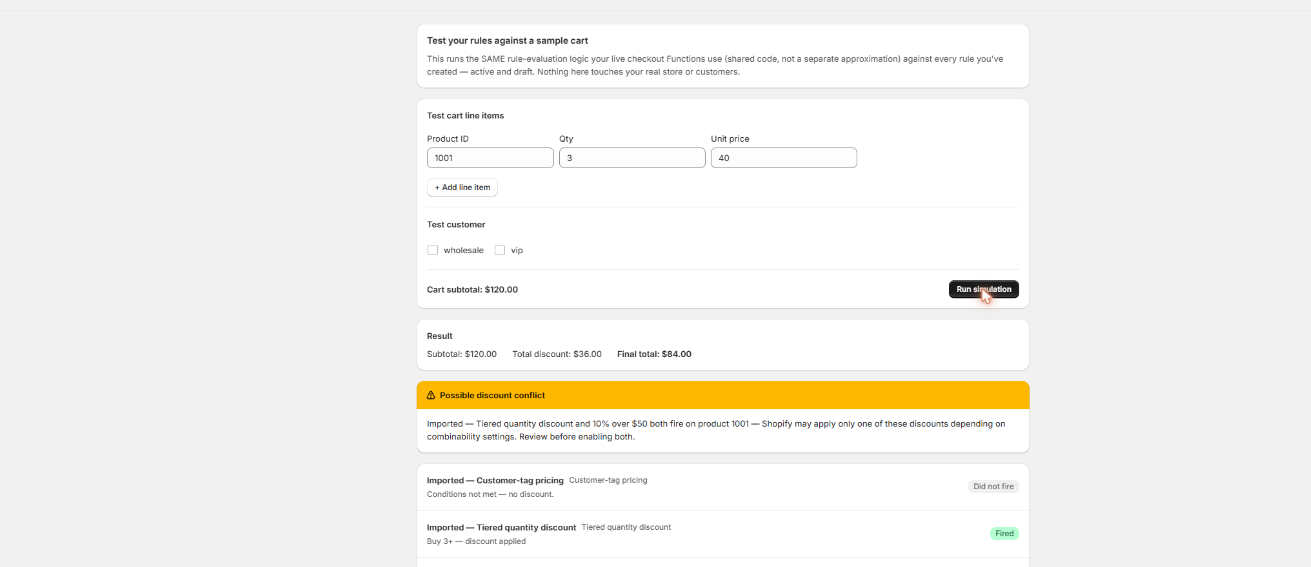
Scriptly's simulator runs your rule against a sample cart so you can watch the discount, shipping or payment change happen before a single real shopper sees it.
Scriptly · rule simulator
Click to enlarge The real Scriptly simulator — test any Function-based rule against a sample cart before you enable it.
What is a Shopify Function, actually?
A Shopify Function is a small, focused piece of backend logic that Shopify runs for you at a specific moment in checkout — never in the shopper's browser, never inside your theme. Today merchants mostly meet Functions through three jobs: customizing discounts (the exact price a shopper pays), customizing delivery (which shipping rates show, in what order, and what they're named), and customizing payment methods (which ones appear, hidden or reordered based on what's in the cart). Shopify calls each of these a "target," and a Function is written to plug into one specific target rather than run loose across your whole store.
The Function runs on Shopify's servers between "cart" and "checkout result" — nothing runs in your theme or a browser tab.
That narrow scope is deliberate. Instead of one general-purpose script that could, in theory, touch anything anywhere, a Function is built for one job and nothing else — which is also how Shopify is able to run it quickly and safely for every checkout on every store, on the same infrastructure, at the same time.
Discount
Changes the price a shopper pays — a percentage off, a fixed amount, or a free gift.
Shipping
Changes which delivery rates show, in what order, and what they're named.
Payment
Changes which payment methods appear, hidden or reordered based on the cart.
If you want the fuller map of what rule types are possible today, our guide to Shopify checkout rules walks through the categories in more detail.
Why Shopify Functions exist
For years, merchants who wanted this kind of checkout customization used Shopify Scripts — Ruby code written directly in a Script Editor built into the admin. Scripts worked, but only on Shopify Plus, and only in a language most store owners couldn't write themselves; every store either paid a developer or went without. Functions replaced that system entirely: the same category of customization — discounts, shipping, payment — rebuilt on a modern API that Shopify supports on every plan, not just Plus.
S
This wasn't optional. Shopify retired the Script Editor and stopped running Shopify Scripts on June 30, 2026, directing every merchant with a discount, shipping or payment Script to Shopify Functions instead. Functions are the platform's supported replacement, not a third-party workaround.
If you're rebuilding something a Script used to do, our broader Shopify Scripts replacement guide covers the move end to end — what changed, what still works the same, and where to start.
You don't need to write any code
Here's the part that surprises a lot of merchants: Functions are built using real code — typically Rust or JavaScript, deployed through Shopify's own developer tooling. You are not expected to write any of that. Apps built on top of Functions, like Scriptly, do the coding once and expose the result as a plain rule builder: form fields where you pick a trigger — a cart total, a product, a quantity, a shipping zone, a payment method — and an outcome, like a percentage off, a hidden shipping rate, or a hidden payment option.
Function
The engine. Code that runs on Shopify's own servers at checkout.
App — like Scriptly
The no-code builder on top. You set the rule in form fields, nothing else.
You fill in the fields, preview the result in a simulator, and switch the rule on. The Function running underneath is genuinely code — but none of it is code you ever touch. A couple of concrete examples of what that looks like in practice: a tiered quantity discount that gives a bigger price break the more a shopper adds to their cart, or hiding a payment method like cash on delivery once an order passes a certain value. Both are Functions under the hood; both are set up entirely in form fields.
What Functions can and can't do
The honest limits, before you build anything
Functions customize specific checkout logic — discounts, shipping options, payment methods, and a handful of other defined spots — not arbitrary code running anywhere in your store.
They can't redesign the checkout page's layout or branding. Visual customization of the checkout page is a separate Shopify feature and isn't something a Function touches.
A Function runs fast, using the data already in the cart and order at that moment; it isn't built to reach out to arbitrary outside services on its own. An app layered on top, like Scriptly, can factor in more, but the Function itself stays self-contained by design.
None of that is a flaw — it's what keeps every Function on every Shopify store running fast and predictably. For the checkout customization merchants actually ask for — a different price at a threshold, a hidden shipping rate, a hidden payment method — it's more than enough.
FAQ
What are Shopify Functions?
Shopify Functions are small pieces of backend logic that run during checkout, on Shopify's own servers, to customize discounts, shipping rates or payment methods. They're the platform's supported way to change specific checkout behavior without touching your storefront theme.
Do I need to know how to code to use Shopify Functions?
No. Functions themselves are built with code, but merchant-facing apps like Scriptly wrap that in a no-code rule builder — you set the condition and the outcome in form fields, and the app deploys the underlying Function for you.
What's the difference between Shopify Functions and Shopify Scripts?
Scripts were Ruby code merchants wrote directly in a Shopify Plus-only Script Editor. Shopify retired Scripts on June 30, 2026. Functions are the replacement: a supported, sandboxed API that works the same way on every Shopify plan, not just Plus.
What's the difference between a Shopify Function and a regular Shopify app?
A Function is the underlying mechanism — the specific hook Shopify runs during checkout. An app is what a merchant actually interacts with. Some apps, like Scriptly, are built entirely on top of Functions and expose them as a no-code rule builder.
Do Shopify Functions work on my plan?
Yes. Unlike Shopify Scripts, which required Shopify Plus, Functions-based apps work on Basic, Shopify, Advanced and Plus plans alike.
Can a Shopify Function do anything I want at checkout?
No, and that's by design. Each Function plugs into one specific checkout target — discounts, delivery options, or payment methods, among a few others. It can't restyle the checkout page or run arbitrary logic outside that scope.
See Shopify Functions at work — no code
Build a discount, shipping or payment rule in form fields, preview it in the simulator, and switch it on. The Function runs itself from there.