Shopify Scripts vs Functions: what actually changed
Shopify retired the Script Editor and stopped running every Shopify Script on June 30, 2026. Shopify Functions is the platform's official replacement for checkout customization — but it isn't a drop-in swap. Here's exactly how the two systems differ, and what a merchant actually needs to know before rebuilding old checkout logic.
Same checkout job — different platform, different plan requirement
Any Shopify plan
Shopify Scripts required Shopify Plus. Shopify Functions ship through regular apps and run on every plan, from Basic up.
No Ruby to write
Scripts meant opening the Script Editor and writing Ruby by hand. A no-code app builds the underlying Function-based rule for you.
The supported path forward
Shopify isn't bringing Scripts back. Functions are the platform's actively maintained way to customize checkout logic today.
See a Functions-based rule before it goes live
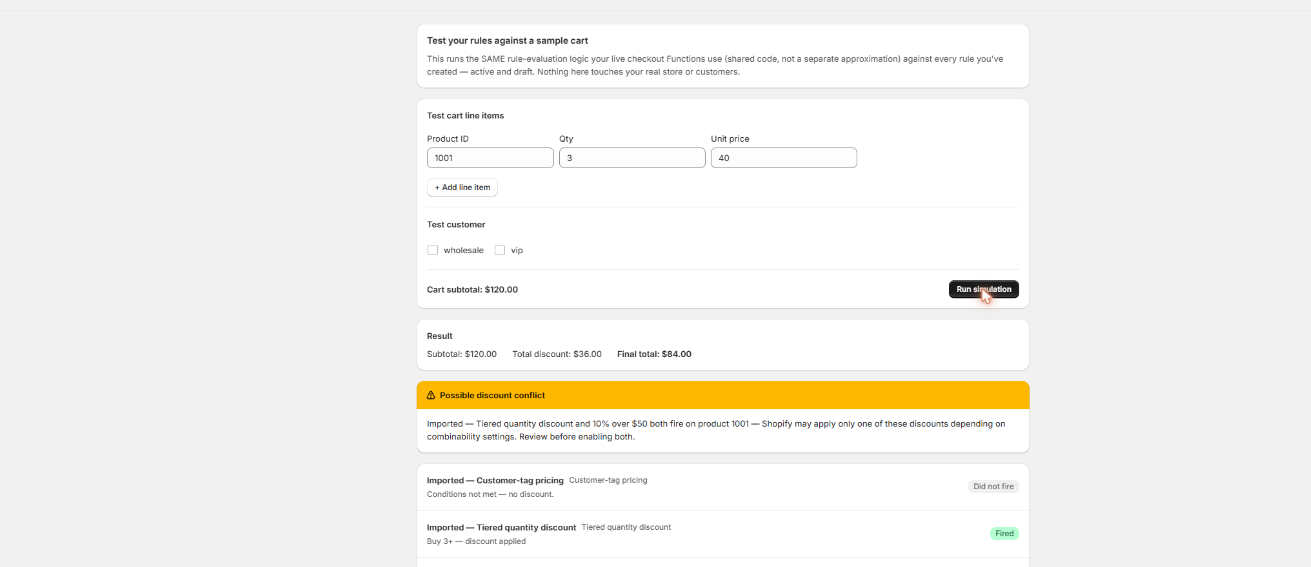
A Shopify Script ran invisibly until something broke. A Functions-based rule built in Scriptly can be tested against a sample cart first, so you see exactly what a shopper will see before it's switched on.
Scriptly · rule simulator
Click to enlarge The real Scriptly simulator — a Shopify Function running behind a no-code rule builder, previewed before it's live.
Ruby Script vs Shopify Function, side by side
The short version, before the details below: what actually changes for a merchant moving off the old Script Editor onto a Functions-based app.
Comparison of Ruby Script and Shopify Function across language, plan availability, where it runs, whether code is needed, and current status
Criterion
Ruby Script
Shopify Function
Language
Ruby
No-code rule builder / Wasm
Plans
✗ Shopify Plus only
✓ Any Shopify plan
Where it runs
Shopify's checkout servers
Both — Shopify's servers & your app's code
Code needed
✗ Yes
✓ No
Status
✗ Retired Jun 30, 2026
✓ Supported
Why Shopify retired Scripts for Functions
For years, Shopify Scripts were the only way to customize what happened during checkout without touching Shopify's own core code. Available exclusively on Shopify Plus, the Script Editor let a developer write Ruby that ran directly on Shopify's checkout servers — discounting specific line items, hiding a payment method for certain carts, or changing which shipping rates a customer saw, all decided by custom logic no theme setting could express.
That architecture came from an older, less extensible version of Shopify's checkout. As Shopify rebuilt checkout to be extensible by design — the same effort that produced checkout UI extensions and Shopify Functions — arbitrary Ruby running directly against checkout internals became a liability rather than a feature. It was harder to sandbox safely, harder to version alongside app updates, and locked to a single Shopify plan. Shopify announced the Script Editor's retirement well in advance, then followed through on June 30, 2026: it stopped executing every Shopify Script platform-wide, with no partial extension and no way to keep an old script running past the cutoff.
S
This wasn't optional. Shopify retired the Script Editor and stopped running Shopify Scripts on June 30, 2026, directing merchants to move discount, shipping and payment logic to Shopify Functions. Every checkout Script went dark on that date, regardless of plan or how long it had been running.
Aug 28, 2025checkout.liquid & old extensibility phased out
Jun 30, 2026Every Shopify Script stops running
NowShopify Functions is the supported path
What Shopify Functions actually are
Shopify Functions are the replacement Shopify built for that same category of checkout logic — but the underlying model is different, not just newer. A Function is a small piece of backend logic, written in a supported language such as Rust or JavaScript/TypeScript, compiled to WebAssembly (Wasm), and shipped as part of an app. Instead of running arbitrary code against the whole checkout, a Function only runs at specific, Shopify-defined extension points: calculating a cart or product discount, adjusting which delivery options are offered, deciding which payment methods are available, or validating a cart before checkout completes.
That narrower, sandboxed model is what makes Functions possible on every Shopify plan rather than Plus alone — Shopify can run compiled, sandboxed Wasm safely at a fixed set of hooks in a way it couldn't safely do with open-ended Ruby. It's also faster and versioned like any other app code, shipped and rolled back the same way the rest of an app is.
For most merchants, none of that Wasm detail is something you touch directly. You either hire a developer to build a custom Function extension for a genuinely one-off requirement, or use an app that ships pre-built Function extensions with a plain-language rule builder on top — which is what Scriptly does for the checkout-rule cases merchants ran Scripts for most often: discounts, payment method visibility, shipping options, and cart validation.
Old
Ruby on Shopify Plus — retired Jun 30, 2026.
New
No-code rules on any plan — supported today.
What carries over — and what doesn't
Read this before you assume Functions are a 1:1 replacement
Plan availability: Scripts required Shopify Plus. Functions-based apps like Scriptly run on any Shopify plan.
Authoring: Scripts meant one developer writing and maintaining Ruby directly. Functions are either written by a developer in Rust or JavaScript for a fully custom case, or configured with no code through an app's rule builder for the common cases.
Scope: a Script could, in principle, touch anything the checkout server exposed to Ruby. A Function only runs at the specific extension point it's registered for — discount calculation, delivery customization, payment customization, or validation — so anything outside those defined hooks isn't something a Function, or an app built on Functions, can reach.
Multi-condition scripts: a single Ruby script that handled several unrelated rules, or several discount tiers, in one file usually needs to become several separate Function-based rules — one per condition — rather than one rule holding all of them.
Nothing transfers automatically: there's no tool that turns a Script into a running Function on its own. The logic has to be rebuilt against the new model, even when an AI-assisted importer can read the old Ruby and suggest the mapping for you to review.
None of this is a hidden catch — it's the actual shape of the platform Shopify moved to. For the checkout customizations most merchants used Scripts for, the practical rebuild is straightforward; the difference is in plan access and how you author the rule, not in whether the same outcome is possible.
What to do now if you had a Shopify Script
Start by listing what your old Scripts actually did — a discount, a payment method restriction, a shipping rule, a cart validation — rather than assuming you need to replace "the whole Script Editor" at once. Most Script use cases fall into a handful of common patterns that a no-code Functions app already covers directly: quantity and tiered discounts, hiding or reordering payment methods, and conditional checkout rules based on cart contents or customer tags.
If you still have the original Ruby, Scriptly's AI importer can read it once — without ever executing it — and map it to the closest rule template for you to review before it goes live. For anything genuinely custom that doesn't fit a rule template, that's the case where hiring a developer to build a bespoke Function extension still makes sense. See the broader Shopify Scripts replacement guide for how to inventory and prioritize old Scripts, the step-by-step migration walkthrough for the mechanics, checkout rules for conditional logic like payment and shipping restrictions, and tiered quantity discounts for volume pricing specifically.
FAQ
What's the difference between Shopify Scripts and Shopify Functions?
Shopify Scripts were Ruby scripts written in the Script Editor, available only on Shopify Plus, and executed directly on Shopify's checkout servers. Shopify Functions are compiled Wasm extensions that run at defined checkout extension points — discounts, shipping, payment, and validation — and are available on any Shopify plan through apps.
Do Shopify Scripts still work?
No. Shopify stopped executing every Script Editor script platform-wide on June 30, 2026. There's no way to keep an old Script running past that date.
Can I write Shopify Functions myself?
Yes, if you or a developer knows a supported language like Rust or JavaScript/TypeScript and Shopify's Functions API. Most merchants skip that layer entirely and use an app with a no-code rule builder instead, such as Scriptly.
Do I need Shopify Plus for Shopify Functions?
No. Shopify Scripts required Shopify Plus. Functions-based apps run on any Shopify plan, from Basic up.
Will my old Script's logic transfer automatically to Functions?
No. There's no automatic conversion. The logic has to be rebuilt against the new extension-point model, though common patterns — quantity discounts, payment method rules, shipping restrictions — map cleanly onto no-code rule templates.
What can Shopify Functions not do that Scripts could?
A Function only runs at the specific extension point it's registered for, so arbitrary code touching anything outside discount, shipping, payment, or validation hooks isn't possible the way it was with open-ended Ruby. Complex scripts that combined several tiers or conditions in one file also typically need to be split into several separate rules.
Rebuild your checkout logic on Functions today
Set the rule, choose the condition, and preview it in the simulator — live at checkout in minutes, no code and no waiting on a developer.