Free gift with purchase on Shopify — rebuilt without code
Spend-and-earn gifts and qualifying-purchase gifts were common Shopify Script Editor builds — a shopper hits a spend amount, or adds the right product, and a specific gift item rings up free. Here's the honest, no-code way to rebuild that logic on Shopify Functions in 2026 — including exactly how the gift has to get into the cart in the first place.
Set a spend threshold or a qualifying product and pick the gift item in plain form fields. No Ruby, no Script Editor, nothing to deploy.
Works on any plan
Scripts were Shopify Plus-only. Scriptly's Functions-based rules run on every Shopify plan.
Live at checkout in minutes
Build it, preview it in the simulator with the gift already in the cart, switch it on. The rule then zeroes the gift's price automatically.
See the exact gift price before it goes live
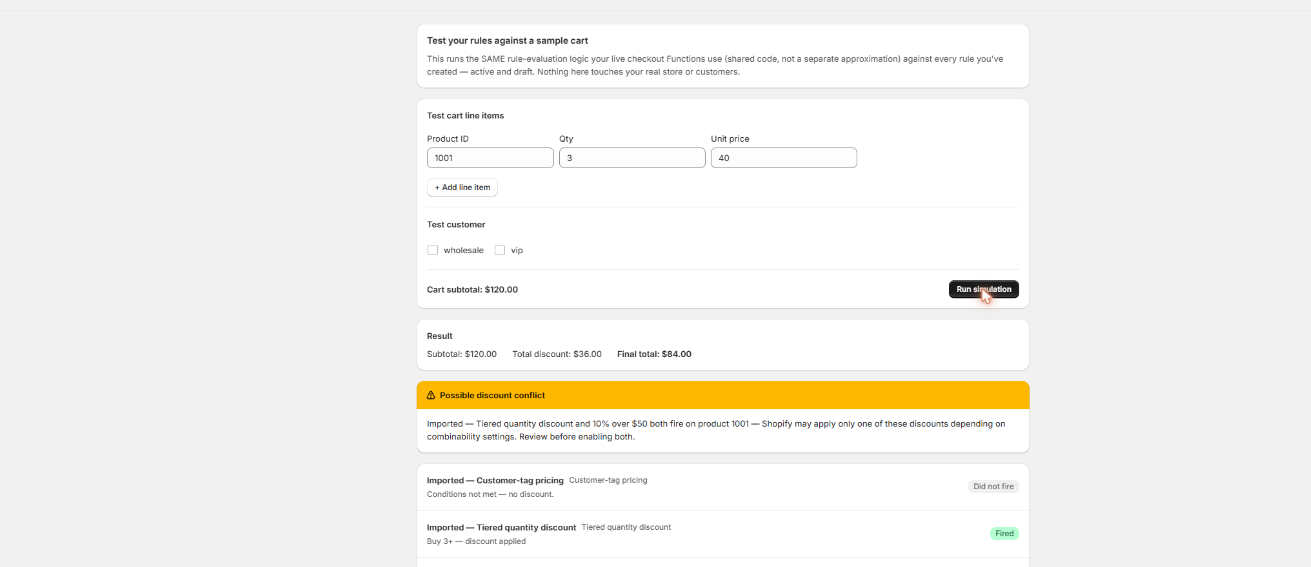
Build a test cart with the gift item already in it, at the qualifying spend, and Scriptly's simulator shows precisely what the gift line will cost — nothing touches real checkout until you've watched the rule work.
Scriptly · rule simulator
Click to enlarge The real Scriptly simulator — test any rule against a sample cart before you enable it.
Why merchants ran free-gift-with-purchase promos
Gift with purchase — sometimes called a spend-and-get promo or a qualifying-purchase gift — was another common Script Editor build, and it's a different mechanic from a straight BOGO deal (buy one, get the identical item free; see our Shopify BOGO app guide if that's what you actually need). A gift-with-purchase promo hands the shopper a specific, often unrelated item — a tote, a sample-size product, a limited pouch — once the cart earns it, either by hitting a spend threshold (the same idea as setting a free-shipping-over-an-amount threshold, just with a gift instead of shipping) or by containing a qualifying product. Typical reasons stores built this:
Raise average order value
"Spend $75, get a free tote" nudges a shopper sitting at $60 to add one more item, without running a blanket sitewide sale that discounts orders that were already going to happen.
Introduce a new or slow-moving product
Give away a product you want shoppers to try — a new scent, a companion accessory, overstock — as the gift, driving trial and awareness without discounting the rest of the catalog alongside it.
Reward loyalty and VIP tiers
A gift at a spend tier feels like a perk rather than a markdown, which suits brands that don't want to be seen running constant percentage-off sales.
Simplify a seasonal promo
Replace a one-off manual discount-code promotion with a standing rule that only hands out the gift once a shopper actually earns it — no code for them to remember or type.
None of that logic survived June 30, 2026. Shopify stopped executing every Script Editor script platform-wide — as we cover in detail here — and gift-with-purchase Scripts went dark along with every other kind. Scriptly rebuilds the same spend-or-qualify-to-earn-a-gift logic as a no-code rule on Shopify Functions, with one honest caveat worth understanding before you build it: the gift itself still has to land in the cart (more on that below). If you're also running a volume promo alongside your gift, see our tiered quantity discount guide.
S
This wasn't optional. Shopify retired the Script Editor and stopped running Shopify Scripts on June 30, 2026, directing merchants to move discount, shipping and payment logic to Shopify Functions. Every gift-with-purchase Script went dark on that date.
The rule comes down to a qualifying condition and a gift product, not a script. None of it requires touching code or waiting on a developer — but step four below is the one honest mechanic worth reading closely.
Open the "Free gift with purchase" rule template
Start from Scriptly's rule builder.
Set the qualifying condition
Define what unlocks the gift — a minimum cart subtotal (spend $75 or more) or the presence of a specific qualifying product.
Choose the gift product
Pick the exact product, and variant if it has one, that becomes the free item once the condition is met.
Understand the mechanic
Scriptly's rule zeroes the gift line's price once the cart qualifies — but the gift has to already be sitting in the cart as a line item. Shopify Functions can discount a line that's already there; they can't reach into a shopper's cart and add a product that isn't. So pair the rule with a way for the gift to actually get added — a cart-drawer button, a promo landing page, or a cart-upsell app — and Scriptly makes sure that line rings up free the moment the condition is met.
Preview in the simulator
Build a test cart with the gift item included and confirm its price drops to $0.00 exactly when the condition is met.
Enable the rule
It goes live as a Shopify Function, zeroing the gift's price automatically at checkout once qualified — no discount code for the customer to enter.
Try it: a free gift threshold in action
Drag the merchandise subtotal to watch a spend $75+, get the tote free rule reprice the cart in real time — the exact same math Scriptly runs at checkout, assuming the gift is already sitting in the cart.
Merchandise in cart
Gift: Canvas Tote, $24.00 value, already in the cart · rule: spend $75+ and the tote is free
Merchandise subtotal$40.00
Canvas Tote (gift)$24.00
Customer pays$64.00
Illustrative example. Below $75 the gift stays full price — no code, no discount code to type.
What to know before you build the rule
The gift has to be in the cart — read this first
Shopify Functions discount cart lines; they don't add new lines. Scriptly's rule can make an existing gift line 100% off once your spend or qualifying-product condition is met — it can't place the product into the shopper's cart for them. Getting the gift into the cart is a storefront job, separate from the checkout rule.
Common ways merchants solve this: a visible "add your free gift" button in the cart drawer, a dedicated promo landing page with the gift's own add-to-cart button, or a cart-upsell app that adds it once the spend threshold shows up. Whichever you use, scope Scriptly's rule to that same product, and it reduces that line to $0.00 the moment the condition is met.
If a shopper removes the gift from the cart before checkout, there's simply no line left to discount — nothing breaks, the rest of the order checks out normally at full price.
Multiple gift tiers — spend $75 for a tote, spend $150 for a jacket — need one Scriptly rule per tier for now, the same way tiered quantity discounts do.
None of this is a hidden catch — it's the honest shape of what a checkout discount Function can and can't do. Getting the gift into the cart is on your theme or a cart app; making it free once it's there is what Scriptly handles.
Migrating your old free-gift Script
If you still have the Ruby from your old gift-with-purchase or spend-threshold Script, you don't have to rebuild the logic by hand. Paste it into Scriptly's AI Script importer, and it reads the code once — it never executes your Ruby anywhere — to identify the qualifying condition and the gift product it discounted, then maps it to the free-gift rule template. You'll see a confidence score and the exact source lines Scriptly matched, and nothing goes live until you review and approve the mapped rule in the simulator.
One thing the importer can't recover: if your original Script used a cart transform to literally add the gift line for the customer, that add-to-cart behavior doesn't carry over automatically, because Functions discount lines rather than injecting them (see above). You'll still need a cart-drawer button, landing page, or upsell app to get the gift into the cart — Scriptly picks up from there and makes it free. If you no longer have the original code at all, skip the importer and fill in the free-gift template directly; see our broader Shopify Scripts replacement guide or the migration walkthrough for how the rest of the Script-to-Functions move works.
FAQ
What is gift with purchase on Shopify?
A promo where a shopper earns a specific free item — not a discount code — once their cart meets a condition, usually a minimum spend or a qualifying product. It's different from BOGO, where the free item is the same product as the one purchased; see our Shopify BOGO app guide for that case.
Does Scriptly automatically add the gift product to the cart?
No. Shopify Functions can only discount a line that's already in the cart down to $0.00 — they can't add a new product to it. The gift item needs to be in the cart first, through a cart-drawer button, a landing page, or an upsell app; Scriptly's rule is what makes that line free once your spend or purchase condition is met.
How do I set a spend threshold for the free gift?
Set a minimum cart subtotal as the rule's qualifying condition — for example, spend $75 or more. Once the subtotal reaches that amount, the gift line's price drops to $0.00 automatically.
Can the gift be tied to buying a specific product instead of a spend amount?
Yes. Scope the condition to a qualifying product instead of a subtotal, so shoppers unlock the gift only when a particular item — not just any $75 of merchandise — is in the cart.
Can I offer different gifts at different spend tiers?
Not in a single rule yet. Each spend tier and its gift needs its own Scriptly rule, the same as tiered quantity discounts.
Do I need Shopify Plus?
No. Scripts were a Shopify Plus-only feature, but Scriptly's Functions-based rules work on any Shopify plan.
Set up your free gift today
Set the spend threshold, pick the gift, and preview it in the simulator — live at checkout in minutes, no code and no waiting on a developer.