Discount stacking on Shopify — combine multiple discounts at checkout, no code
Combining a volume discount with free shipping, or a welcome code with an active sale, was easy to fake in a Shopify Script — the code just added up whatever you told it to. Shopify Functions works differently: what's allowed to stack at checkout is governed by rules built into Shopify itself, not by an app. Here's exactly how Shopify handles combining discounts, and how to build no-code rules with Scriptly that stack the way checkout will actually let them.
Scriptly rules are set up around Shopify's actual product, order and shipping discount classes — so what you build is stackable within Shopify's limits, not a promise of unlimited stacking checkout won't honor.
No code, no developer
Pick the discount, choose which other discounts it can combine with, and save. No Ruby, no Script Editor, nothing to deploy.
Preview the combined total first
See exactly what a shopper pays when two rules apply together in the simulator, before either rule goes live at checkout.
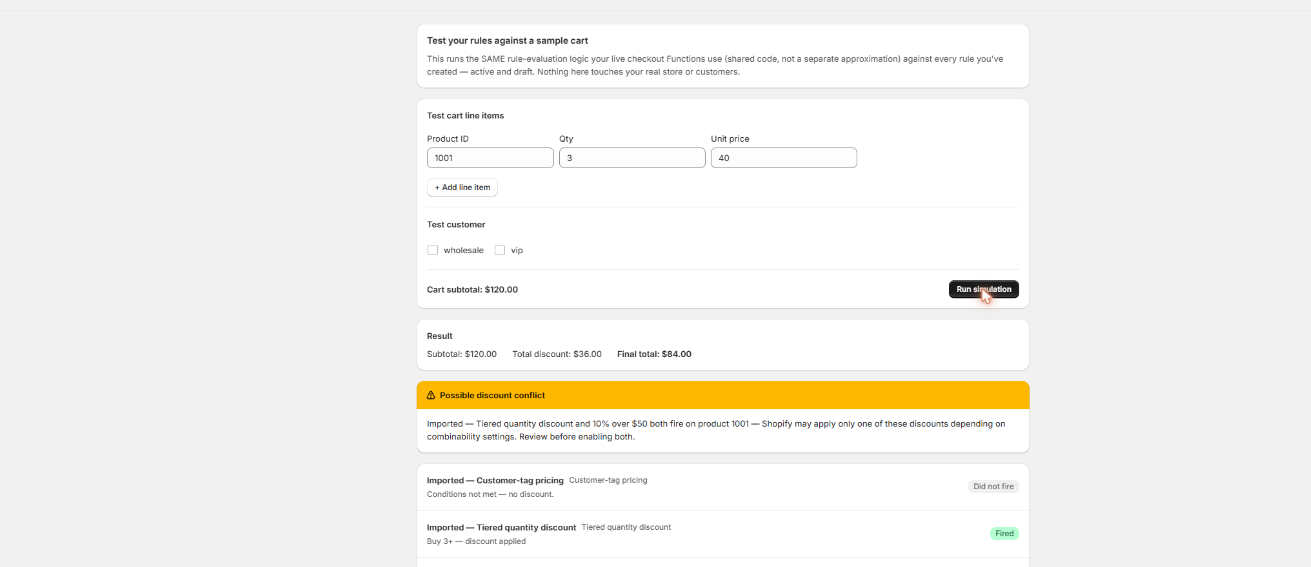
See the combined total before it goes live
Build a test cart against two rules at once and Scriptly's simulator shows exactly what stacks and what doesn't — nothing touches real checkout until you've watched it work.
Scriptly · rule simulator
Click to enlarge The real Scriptly simulator — test any rule, or two rules together, against a sample cart before you enable them.
Why merchants want discounts to stack
Almost nobody wants exactly one discount type. A shopper who hits a volume discount threshold still expects a running free-shipping offer to apply too. A new customer with a welcome code expects it to work even if a sitewide sale happens to be live. Before June 30, 2026, merchants often handled this by writing a single Script that quietly applied every discount it could find, whether or not that combination made financial sense. Common reasons stores want two discounts to run together:
Volume discount + free shipping
A shopper who buys enough to earn a quantity break shouldn't lose the free-shipping perk that was already running — both should show up on the same order.
Welcome code + a sitewide sale
A first-order discount code layered on top of an automatic promotion that happens to be active at the same time, so neither offer cancels the other out.
Product deal + order-level percentage
A fixed amount off one product, plus a cart-wide percentage off during a sale weekend — two different discount targets, applied at once.
A buy-one-get-one product promotion running alongside a threshold-based free-shipping rule, rather than forcing a shopper to choose one or the other.
None of that custom combining logic survived June 30, 2026. Shopify stopped executing every Script Editor script platform-wide — as we cover in detail here — including whatever ad-hoc rules a Script used to decide which discounts could run together. Scriptly rebuilds that logic as no-code rules on Shopify Functions, set up around the combination system Shopify actually runs at checkout.
S
This wasn't optional. Shopify retired the Script Editor and stopped running Shopify Scripts on June 30, 2026, directing merchants to move discount, shipping and payment logic to Shopify Functions. Every custom discount-combining Script went dark on that date.
Shopify groups every discount — automatic or code-based — into one of three classes: product, order, and shipping. A discount's own settings decide which of the other classes it's allowed to combine with. Building a stackable Scriptly rule comes down to setting that up correctly, not writing logic.
Pick the discount class for the rule
Decide whether the rule is a product discount (applies to specific products/variants), an order discount (applies to the cart subtotal), or a shipping discount (applies to shipping rates).
Choose which other classes it can combine with
Turn on combination with the other classes you want this rule to stack with — for example, a product discount that's allowed to combine with shipping discounts.
Build the second rule to match
Set up the second discount the same way, in a class that's allowed to combine with the first (a shipping-class rule combining with the product-class rule you already built, for instance).
Preview both together in the simulator
Build a test cart that qualifies for both rules and confirm the combined total is exactly what you expect before either one is live.
Enable both rules
Shopify's checkout — not Scriptly — is what actually runs the combination at the moment of checkout, applying both discounts automatically when a shopper qualifies for both.
What to know before you build a stacking rule
Read this before you promise "stacking" to customers
Only three discount classes exist: product, order, and shipping. Every discount, however it's built, falls into exactly one of them.
Two discounts of the same class generally don't stack. Shopify runs at most one product discount, one order discount, and one shipping discount on an order at a time — you can't have two product-class discounts both apply to the same line simultaneously.
Combining across classes is opt-in, not automatic. A discount only combines with another class if its own "combines with" setting explicitly allows that class. A volume discount (product class) and a free-shipping discount (shipping class) can be set to combine — but they won't unless that setting is turned on for both.
Some pairings are far more common than others. Product + shipping, and order + shipping, are typical, straightforward combinations. Product + order can also be allowed, but it depends on how each discount is configured — it isn't automatic just because the classes differ.
Discount codes follow the same rules as automatic discounts. A shopper entering more than one discount code, or a code alongside an automatic promotion, only works if the classes involved are set to combine — it isn't unlimited coupon stacking.
None of this is a Scriptly limitation — it's how Shopify's discount engine works platform-wide, for every Functions-based discount app. Scriptly's rule builder surfaces the class and combination setting for each rule so you set it correctly, but Shopify's checkout is what enforces it.
Migrating an old discount-stacking Script
If you still have the Ruby from a Script that combined several discounts, you don't have to work out the old logic by hand. Paste it into Scriptly's AI Script importer, and it reads the code once — it never executes your Ruby anywhere — to identify each discount the Script applied and which conditions triggered it, then maps each one to its own rule template. You'll see a confidence score and the exact source lines Scriptly matched for each discount, and nothing goes live until you review and approve every mapped rule in the simulator.
The importer can identify what your old Script discounted; it can't tell you which combinations Shopify will actually run, since that depends on the class and combination settings you choose for each rule going forward — see the honest breakdown above before assuming two rules will stack. If you no longer have the original code at all, skip the importer and set the discount class and combination settings directly on each rule; see our broader Shopify Scripts alternative guide or the Ruby-to-Functions conversion walkthrough for how the rest of the Script-to-Functions move works, or the checkout rules overview for everything a Functions rule can control.
FAQ
Can I stack unlimited discounts on Shopify?
No. Shopify groups discounts into three classes — product, order, and shipping — and generally runs at most one discount per class at a time. Discounts across different classes can combine, but only if each discount's own settings explicitly allow it. It isn't unlimited stacking.
Can a product discount and a shipping discount combine?
Yes, this is one of the most common combinations — for example a volume discount (product class) and free shipping (shipping class) can both be set to combine so they apply together on the same order.
Can two discount codes stack at checkout?
Only if the discount classes involved are configured to combine. Two discount codes in the same class generally don't both apply; a code alongside an automatic discount in a different, combinable class can.
Is discount stacking a Scriptly limitation?
No. The class system and combination rules are how Shopify's checkout works platform-wide, for every Functions-based discount app, not something Scriptly imposes. Scriptly surfaces the class and combination setting for each rule so you configure it correctly.
Do I need my old Script code to rebuild a stacking rule?
No. The AI importer speeds up setup if you have the original Ruby, but you can set the discount class and combination settings directly on each rule without any original code.
Do I need Shopify Plus?
No. Scripts were a Shopify Plus-only feature, but Scriptly's Functions-based rules, including combination settings, work on any Shopify plan.
Set up discounts that stack correctly
Build each rule, choose exactly which discount classes it combines with, and preview the combined total in the simulator — live at checkout in minutes, no code required.