Don't burn your margin this BFCM — backtest promos before you launch
November is when the discounts go out. December is when you find out what they cost. Scriptly now replays any discount rule against your real orders before it runs, and holds a hard floor under it at checkout, so a pile-up of promos can't quietly sell your best products below cost.
Illustrative example · your figures come from your own order history
Replay a promo on real orders
Promo Backtest runs the rule you're about to launch across your last 30, 60 or 90 days of orders: how many would have qualified, how much you'd have handed back, and what it does to revenue and margin.
A floor the checkout enforces
Profit Guard caps how much a rule may give away, as a percentage of the cart, and holds a per-variant margin floor. The checkout Function enforces it, so it isn't a report you read in January.
Margin math on real cost prices
Where a product carries a cost per item in Shopify, we use it. Where it doesn't, the margin column stays empty for that line. We won't invent a cost to make a number look complete.
Watch the cart before your customers do
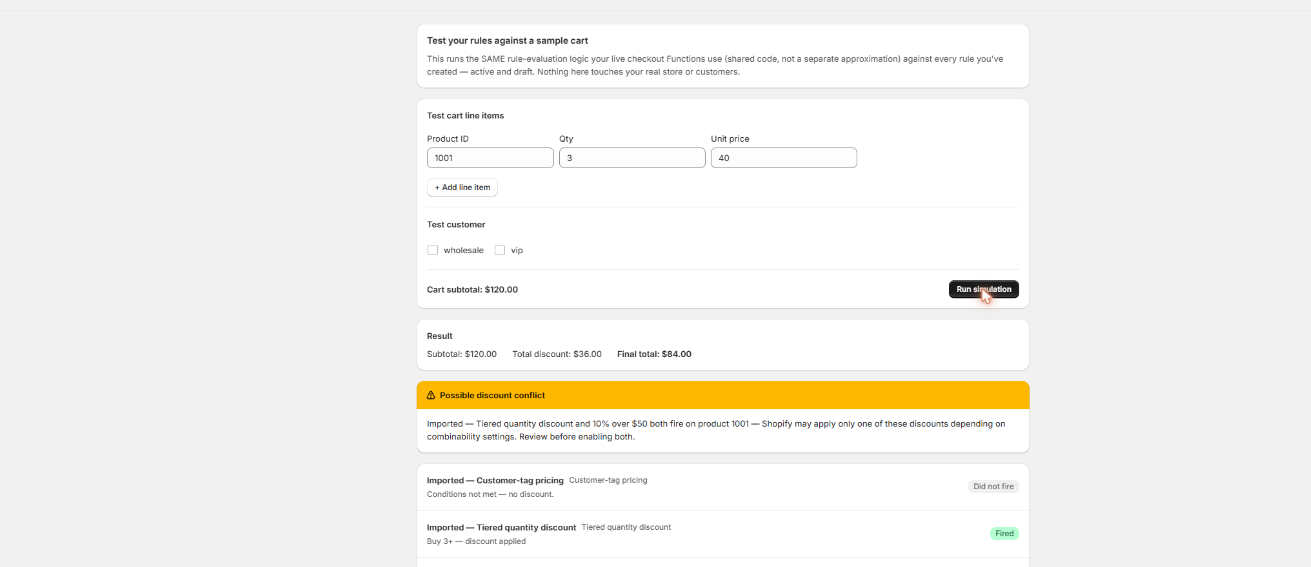
Build the messiest cart you expect on the last Friday in November, run it through the simulator, and read the bottom line. Nothing touches live checkout until you've seen the rule behave.
Scriptly · rule simulator
Click to enlarge The real Scriptly simulator — test any rule, or several at once, against a sample cart before you enable them.
The December surprise
It goes the same way most years. Revenue looks great through Cyber Monday. Then the December books come back, gross margin is thinner than anyone expected, and nobody can point at the promo that did it, because no single promo did. It was four of them landing on the same order. Here's where the money goes.
One percentage across a mixed catalog
Thirty percent off is comfortable on a 65% margin candle and painful on a 22% margin gadget. A sitewide percentage treats both the same, and the items with the thinnest margins are often the ones shoppers put in the cart first.
Promos that meet in the cart
The sale rule, the free-shipping threshold and the welcome code were each defensible on their own. On one order, with a shopper who worked out how to qualify for all three, they aren't.
Shipping paid out of what's left
Free shipping over a threshold comes out of the same margin the discount already cut into. A heavy, low-margin item shipped across the country is where that shows up first.
A gift chosen by what's in stock
Gift with purchase is a marketing cost you budget for. It stops being one the week the gift gets swapped for whatever's sitting in the warehouse, and the substitute costs three times as much to give away.
None of it shows up in a discount report as a problem. The report says the promo worked: orders up, codes used. What it never says is what those orders were worth after cost of goods, and that's the number worth checking in September, while the promo calendar is still a draft.
$
Margin math needs a cost per item. Shopify stores a cost on each variant, and that field is what any honest margin number is built from. Scriptly reads it. Where it's blank, a backtest still counts the qualifying orders and the discount dollars, and simply leaves margin empty for those lines rather than guessing at a cost.
Six steps, in order. The first one is yours; the rest Scriptly does with you. It takes an afternoon in September and saves the argument in January.
Fill in the cost prices you're missing
Everything downstream depends on this one field in the Shopify product editor. You don't need the whole catalog: start with the products going on sale, and the bestsellers that get discounted whether you planned it or not. No app can calculate a margin from a cost it doesn't have.
List every promo that will be live in November
Sitewide percentage, quantity breaks, BOGO, the free-shipping threshold, gift with purchase, the VIP code you send your list. Write them down in one place. The count of promos live at once is usually the problem, not any single one.
Backtest each one against your own orders
Pick a 30, 60 or 90-day window and let Promo Backtest replay the rule over what actually sold: orders that would have qualified, total discount given away, revenue affected, and margin impact on every line carrying a cost price. It beats a spreadsheet built on average order value.
Set the floor before you launch, not after
Profit Guard gives a rule a ceiling on what it may hand over, as a percentage of the cart. For rules targeting products or collections, add a per-variant margin floor so the discount stops short rather than cutting into cost. The Function enforces it at checkout, on the live order.
Decide deliberately what may combine
Shopify sorts every discount into product, order and shipping classes, and one only stacks with another class if you allow it. Scriptly puts those combination checkboxes on each rule, so what may run together stays a decision you make on purpose. The stacking guide covers what checkout will and won't honor.
Test the worst realistic cart, then go live
Not a tidy one-item cart. The one where the shopper hit the quantity break, crossed the shipping threshold and pasted the code. Run it in the simulator, look at what's left per line, and switch the rules on once that number is one you'd take a thousand times over a weekend.
Try it: where does the floor sit?
Drag the discount on a single item that sells for $40 and costs you $23 to buy. Watch where the margin runs out.
Discount on the item
Sale price $40.00 · your cost $23.00 · shipping and fees not counted
Full price$40.00
BFCM discount (25%)−$10.00
Your cost of goods−$23.00
Margin left$7.00
23% of what the shopper pays is still yours.
Illustrative example. This item drops below cost somewhere past 42% off, before free shipping or payment fees are counted at all. Your own break-even point comes from your cost prices.
What a floor can stop, and what it can't
Two discounts stacking below cost is the fear everyone brings to BFCM, so it's worth being precise about who controls what. Whether a second discount applies at all is Shopify's call, decided by the combination settings on each discount and the classes they belong to. No app overrides that, and any app promising to police another app's discount is describing something checkout doesn't allow.
What Scriptly controls is the discount Scriptly gives. Profit Guard puts a ceiling on that rule and, where it targets products or collections, a margin floor per variant, both enforced inside the checkout Function as the order is priced. The practical answer is two-sided: combination settings decide which promos may meet in a cart, and the floor makes sure the ones that do meet still stop short of your cost. Backtest first and you'll know which carts to worry about before a shopper finds them.
A backtest replays history; it doesn't forecast BFCM. It tells you what a rule would have done to orders you already have. Cyber Week traffic is bigger, cart mixes shift, and a promo drives behavior that quiet October orders never showed. Read it as a sanity check, not a prediction.
Margin is computed only where a cost price exists. Lines without a cost per item still count toward qualifying orders and discount given away, but they carry no margin number. That gap is shown rather than filled in.
Cost prices are today's, not the order's. The backtest reads the cost sitting on the variant right now. If your landed cost moved since those orders shipped, the margin figure reflects what you pay now.
Per-variant margin floors need a product or collection target. A rule taking a percentage off the whole cart is governed by the per-rule cap instead, since there's no single variant to measure a floor against.
Scriptly caps Scriptly. Another app's Function, a manual draft-order discount, or a percentage someone applies in the admin all sit outside the rule's ceiling. Shopify's combination settings are the lever there.
Adding a free gift to the cart is still a storefront job. Functions discount lines already in the cart; they don't create new ones. Our gift-with-purchase guide covers how merchants get the gift in there, and Scriptly takes that line to zero once it is.
None of this is a catch buried in a pricing page. It's the honest shape of what a checkout Function and your own order history can tell you, which is more than most stores have going into November.
FAQ
Can any app stop two discounts stacking below cost?
Not by policing another app's discount, no. Whether two discounts apply together is decided by Shopify's combination rules and the product, order and shipping classes each belongs to, and no app overrides that. What a Function can do is cap its own rule: Profit Guard sets the most a rule may give away as a percentage of the cart, plus a per-variant margin floor on product and collection rules, enforced by the checkout Function. Combination settings decide what meets in the cart; the floor decides how far our rule goes once it's there.
How far back does a promo backtest look, and is it a forecast?
You choose a 30, 60 or 90-day window of your real orders, and the rule is replayed across them. It reports qualifying orders, total discount given away, revenue affected and margin impact. It isn't a forecast. BFCM sells more, and it sells differently, so treat the result as a check on whether the mechanic is safe rather than a prediction of the weekend.
What happens to products that have no cost price?
They're counted in the order and discount figures and left out of the margin figure. We won't invent a cost to fill the column, because a made-up margin is worse than a blank one. If the margin coverage looks thin, that's a prompt to fill in cost per item on the products going on sale before you decide anything.
Does the margin floor run at checkout or is it just a report?
At checkout. The cap and the per-variant floor are enforced by the discount Function while the order is being priced, so a cart that would have breached the floor gets a smaller discount instead of a refund conversation later. The backtest is the report; Profit Guard is the enforcement.
Do the margin math while it's still September
Backtest the promos you're planning against the orders you already have, set the floor, and test the cart before Cyber Week does it for you. There's a free plan if you want to try one rule first.