The 3 Shopify Script types — and what replaced them
Every Shopify Script fell into one of three categories: line item, shipping, or payment. All three stopped running on June 30, 2026. This is the reference — what each type did, the classic patterns built inside it, and the exact no-code Functions rule that replaces each one today.
Volume discounts, BOGO, free gifts, wholesale pricing, shipping and payment rules — the patterns that ran in Script Editor each map to a rule template below.
Works on any Shopify plan
All three Script types required Shopify Plus. Every Functions rule on this page runs on Basic, Shopify, Advanced, or Plus.
Preview before it's live
Whichever category you're rebuilding — line item, shipping, or payment — Scriptly runs the rule against a sample cart first, before it ever touches real checkout.
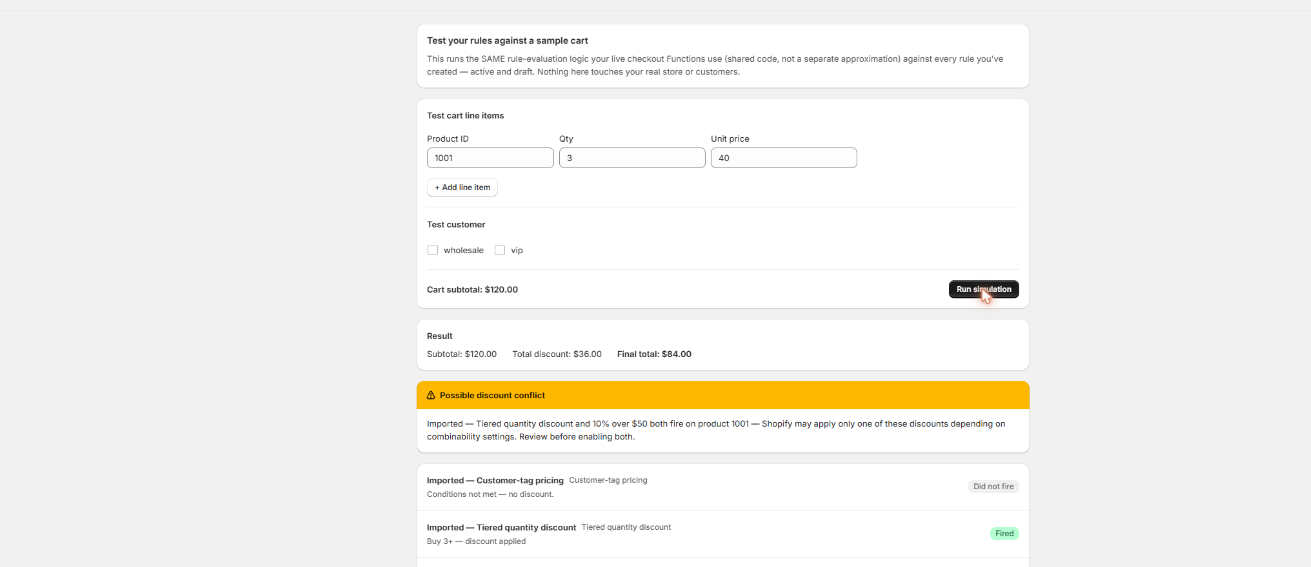
Preview any rule before it goes live
Whichever Script type you're rebuilding — discount, shipping, or payment — Scriptly runs the rule against a sample cart first, the same simulator behind every rule page linked from this reference.
Scriptly · rule simulator
Click to enlarge The real Scriptly simulator — it previews every rule type on this page before you enable it.
The 3 Script types Shopify's Script Editor actually had
Every Shopify Script belonged to exactly one of three categories, because that's how the Script Editor's API was structured. A store could run one active script per category: one line item script, one shipping script, one payment script. That's the full inventory.
Line item scripts — modified the price of cart line items. Every discount a Script Editor store ran — volume, BOGO, tiered, wholesale — lived here, because it was the only category that could touch a line's price.
Shipping scripts — modified the shipping rates Shopify's rate calculation returned: hide a rate, rename its checkout label, reorder the list, or change what a rate cost.
Payment scripts — modified the payment methods a customer saw at checkout: hide a method, rename it, or reorder the list.
Shopify Plus was required for all three — the Script Editor never shipped on any other plan. All three stopped running the same day, with checkout falling back to full, unfiltered defaults.
S
This wasn't optional. Shopify retired the Script Editor and stopped running Shopify Scripts — line item, shipping, and payment alike — on June 30, 2026, directing merchants to move all three kinds of logic to Shopify Functions.
Line item scripts were the biggest category by far — almost every discount a Script Editor store ran lived here. Here's how the classic patterns map to a no-code Functions rule:
Two patterns don't reduce to one rule yet, and we'd rather say so than oversell it. A Script that stacked several breakpoints in one file — 3+ units at 10% off, 5+ at 15%, 10+ at 20% — needs one quantity-discount rule per breakpoint, not one rule holding the whole ladder. And a Script that discounted the entire order once the subtotal crossed a number, rather than one line or a gift, isn't a one-click template yet — check the full checkout rules hub for the current catalog before assuming it's covered.
Shipping scripts → Shipping rules (with one catch)
Shipping scripts could hide a rate, rename its checkout label, reorder the list, or discount what a rate cost. On Functions, that single category splits into two extension points, because Shopify built two separate tools for touching shipping:
Delivery Customization — hides, renames, or reorders shipping options. No way to change what a rate costs.
Discount Functions (shipping target) — changes what a rate costs, including down to $0.00. Can't hide, rename, or reorder options.
A Script that hid Express for PO boxes and one that made shipping free over $75 looked similar on the surface, but they map to two different rule types:
A real price change — the rate's cost drops to $0.00 once the cart subtotal clears a threshold. Built as a Discount Function, because only a discount can touch price.
Remove Express for PO boxes, relabel a carrier's checkout name, or push a preferred rate to the top of the list — all the same Delivery Customization rule, just a different action.
Payment scripts could hide a method, rename its label, or reorder the list. On Functions this is Payment Customization, and today's no-code rule covers hiding and renaming — reordering isn't part of the template yet, unlike its shipping counterpart.
One thing no payment Script could do either, and no Functions app can do now: touch Shopify's own accelerated or buy-now-pay-later methods — Shop Pay, Shop Pay Installments, or wallet buttons like Apple Pay and Google Pay. Those are controlled by Shopify itself, not by any third-party Function.
All 3 Script types, side by side
Script type
What it did
Functions replacement
Any plan?
Line item script
Changed a cart line's price — every discount pattern lived here
Discount Functions
✓Yes
Shipping script
Hid, renamed, or reordered a rate — or changed what it cost
What to know before you map an old Script to a rule
Multi-tier stacks
One rule per tier — a 3-tier ladder needs 3 rules, not one.
Delivery Customization
Hides, renames, reorders a rate — can't touch what it costs.
Payment reordering
Hide and rename are covered — reordering payment methods isn't, yet.
Shop Pay & co.
Shopify's own accelerated methods can't be hidden by any Function.
Read this before you assume a pattern is covered
If your old shipping Script changed a rate's cost, not just its visibility, it needs a Discount rule, not the hide/rename/reorder rule — see the catch above.
Wholesale/tag pricing currently watches two tags — wholesale and vip — on a logged-in customer's account. Guest checkouts never match a tag-based rule.
Collection-wide scoping isn't available yet for discount rules. Pick the specific products a rule applies to rather than pointing it at a collection.
A Script that stacked several tiers, breakpoints, or gift levels in one file needs one rule per tier today, not one rule holding the whole ladder.
None of this is a hidden catch — it's the honest shape of what a no-code Functions rule can do today, category by category.
Not sure which category your old Script falls into?
If you still have the Ruby, paste it into Scriptly's AI Script importer. It reads the code once — never executes it — to identify whether it's a line item, shipping, or payment script, then maps it to the matching rule template above, with a confidence score and the matched source lines. Nothing goes live until you review it in the simulator.
No original code, or want every rule type in one place first? The full checkout rules hub covers all of them.
FAQ
What are the three types of Shopify Scripts?
Shopify's Script Editor had exactly three categories: line item scripts (cart line prices), shipping scripts (shipping rates), and payment scripts (payment methods at checkout). Every Script fell into one of the three.
What replaced Shopify Scripts after the shutdown?
Shopify Functions. Line item scripts map to Discount Functions, shipping scripts split across Delivery Customization (hide/rename/reorder) and Discount Functions (price changes), and payment scripts map to Payment Customization.
Can one Script type need more than one Functions rule?
Yes. A Script that stacked several discount tiers or gift levels in one file needs one rule per tier today. And a shipping Script that both hid a rate and changed its price needs two rules — Delivery Customization for the hide, a Discount Function for the price — since those are separate extension points.
Do the no-code Functions replacements need Shopify Plus?
No. All three Script types were Shopify Plus-only. Every rule template here runs on Basic, Shopify, Advanced, or Plus.
Can a Functions rule change what a shipping rate costs, the way a Script could?
Only through a Discount Function. Delivery Customization can hide, rename, or reorder shipping options but can't touch price — a real cost change, like free shipping over $75, has to be a discount instead.
Can a Functions rule hide Shopify's own payment methods, like Shop Pay?
No. No third-party Function, Scriptly included, can touch Shopify's own accelerated or buy-now-pay-later methods — Shop Pay, Shop Pay Installments, Apple Pay, Google Pay. Only merchant-added methods, like Cash on Delivery, can be targeted.
Find your rule and build it today
Every classic Script pattern above maps to a rule you can set up in minutes — no code, no waiting on a developer.